

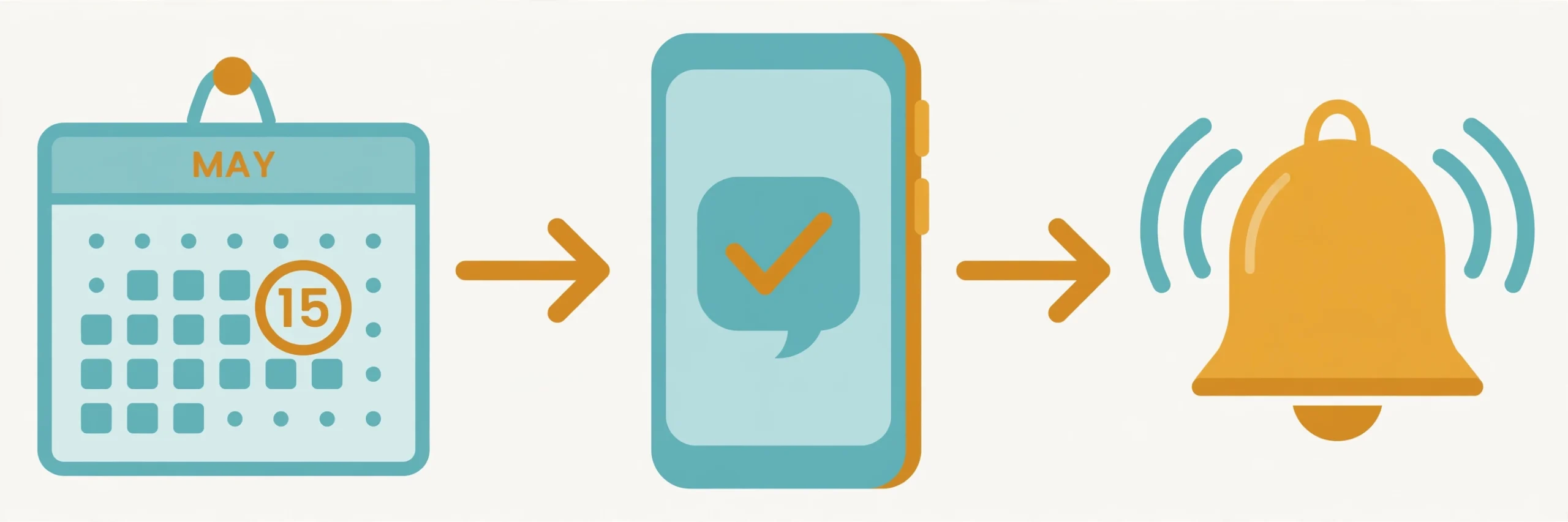
A customer books a haircut for Tuesday at 10am. Nobody writes it down in the right place, nobody confirms it, and on Tuesday morning the chair sits empty for an hour while the phone rings with someone else asking for that same slot. The business did not lose the customer because the haircut was bad. It lost an hour because the booking lived in someone’s head, the reminder never went out, and nobody noticed until the hour was already gone.
That is the job this guide solves. It shows you how to automate appointment booking reminders small business owners can actually run themselves, with no code: one system in which the customer books themselves, the system confirms and reminds, and a human only steps in for the exceptions — a no-reply, a reschedule, a no-show. You will learn what the whole system looks like end to end, how to start from the booking tool you already use instead of buying a new one, how to build it in two layers so the simple version works before anything clever is added, what the reminder sequence should be and what each message must contain, the stop rule that keeps a rescheduled customer from being chased by the old booking, what to do when a customer does not reply or does not show up, and what happens after the appointment. There is one worked example carried through the whole article — a small hair salon, a customer called Sara, and a haircut on Tuesday at 10am — so you can copy the shape of it for your own business, whether you run a salon, a clinic, or a home service.
No prices are quoted here, because plans and limits change and you should check them on the tool’s own page before you pay for anything. No no-show reduction figures are quoted either, because the numbers circulating in other guides come from sources this article has not verified, and a percentage you cannot stand behind is worse than no percentage at all. What is here instead is a system you can build, test, and check every week — and that is what actually stops the empty chair.
For the bigger picture, see 25 AI Automation Examples for Businesses in 2026.
What the System Does
Most guides about appointment reminders only cover the reminders. They tell you to send a message 24 hours before and another one on the day, and then they stop. That is only one layer of the job, and on its own it leaves the most expensive failures untouched: the booking that was never confirmed, the customer who moved their appointment and still got reminded about the old one, the no-show nobody followed up, and the customer who came once and was never spoken to again.
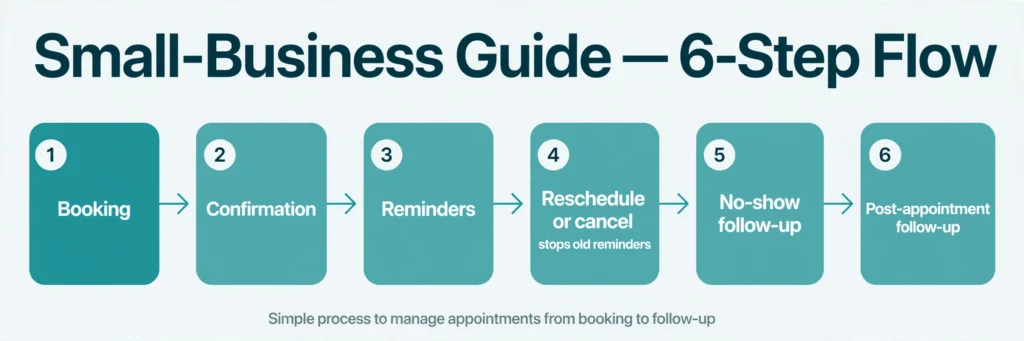
The system in this guide covers the whole journey, from the moment a customer decides to book to the moment after they leave. It has six steps, and each one exists because skipping it costs either time or a customer. Together, the six steps make one appointment reminder system for small business owners who want bookings to run themselves without losing the human touch — and the point of this guide is to show you how to automate appointment booking reminders small business customers can rely on, end to end, instead of bolting one reminder onto a booking form and hoping for the best.
- Booking. The customer books themselves, from a link you send or a page on your website, and picks a real slot from your real availability. No phone tag, no “let me check the diary and call you back.” The booking tool holds the slot the moment it is chosen, so two customers cannot take the same hour.
- Confirmation. The moment the booking is made, the customer gets a confirmation with everything they need: the service, the date and time with the time zone, the location or meeting link, and a reschedule or cancel link. This is the message that stops the “did it actually book?” phone call.
- Reminders. A short sequence of reminders goes out before the appointment — three messages by default, as this guide recommends below — each one carrying the same facts, so the customer never has to search for them.
- Reschedule or cancel. If the customer moves or cancels, everything downstream stops. The old reminders never fire, the freed slot opens again, and the new booking starts its own sequence. This is the stop rule, and it gets its own section because it is where most reminder systems quietly go wrong.
- No-show follow-up. If the customer does not arrive, the system does not keep messaging them. One human follow-up, one rebook offer, and then it stops. A workflow that keeps chasing a no-show is not persistent. It is rude.
- Post-appointment follow-up. After the appointment, one follow-up goes out — a receipt, any notes from the visit, and a review request if that fits your business — and then the sequence ends. The longer relationship, the one that turns a first visit into a regular customer, is a separate job, and it is covered in How to Automate Customer Onboarding for a Small Business (Without Losing the Personal Touch).
Here is the worked example this article carries through. Sara books a haircut at a small salon for Tuesday at 10am, through the booking link on the salon’s website. The moment she books, she gets a confirmation: haircut, Tuesday 10am, the salon’s address, and a link to move or cancel it. On Monday at 10am she gets a reminder. On Tuesday at 8:30am she gets a final nudge. She arrives, gets her haircut, and on Tuesday afternoon she gets one message with her receipt and a thank-you. That is the whole system, and every section below is about making one of those steps work reliably — including the steps Sara never sees, like what happens if she moves the booking to Thursday, or if she never replies at all.
Two design rules run through the entire system, and they are worth stating before any building starts. First, save the booking first, then send the messages. If the confirmation fails, the booking must still exist in the diary, and the owner must still be able to find it. A system that sends a beautiful confirmation and loses the booking is worse than no system at all. Second, a human approves anything the customer sees that is not a plain fact, and a human owns a weekly check that the system still runs. Those two rules are the same ones behind the two-layer method in No-Code Automation for Small Business: Build Your First Workflow Without Writing Code — build the plain version first, add one clever step only after the plain version works, and never let the workflow decide something a person should decide.
Start With the Booking Tool You Already Use
The most common mistake in this kind of automation is buying a new tool before checking what the one you already use can do. Many small businesses already have a booking tool — the scheduling feature inside their calendar, their salon or clinic software, or the booking page their website already offers — and most of those tools already send a confirmation and at least one reminder on their own. If yours does, you may already own half of this system, and the job is to switch its reminders on and shape them properly, not to rebuild everything in a connector.
Start by answering four questions about the tool you already use, before you look at any other tool.
- Does it hold a real slot? When a customer picks Tuesday at 10am, is that hour blocked for everyone else at once, or can two people still book it? If two people can book the same hour, the tool is a form, not a booking system, and no reminder sequence will fix the double-booking underneath it.
- Does it confirm automatically? The moment a booking is made, does the customer get a message with the service, date, time, location, and a way to move or cancel it? If the tool only sends a confirmation when someone remembers to press a button, the confirmation is a human job wearing a tool’s name, and it will be forgotten on a busy day.
- Does it remind, and can you control the timing? Can you set the reminders yourself — one at booking, one 24 hours before, one 1–2 hours before — or does the tool send a single fixed reminder you cannot change? If you cannot control the timing, you cannot run the sequence this guide recommends, and you will need a connector for the reminders layer only.
- Does it stop when a booking moves? If a customer reschedules from Tuesday to Thursday, do Tuesday’s reminders stop on their own? Test this with your own test booking before you trust it, because this is the failure that embarrasses a business: a customer who moved their appointment, reminded about the appointment they no longer have.
- Does it sync two-way with your calendar and log the booking in your CRM or contact record? If the diary and the booking tool disagree, the reminders will disagree with both of them. The booking, the calendar, and the customer record must all show the same appointment, or the customer will get a reminder for a booking the diary says does not exist.
The tools small businesses usually already have are Calendly or Acuity for booking, Google Calendar as the diary, and Twilio or WhatsApp (via WATI or WhatsAble) for SMS. If you have no booking tool at all, the simplest record is a Google Sheet with one row per booking and a Status column — confirmed, reminded, cancelled — which is enough to drive the reminders until you outgrow it. And if you take payment or a deposit when the customer books, connect it to the confirmation trigger: a paid booking is confirmed twice over, and paid bookings ghost less often than unpaid ones, because the customer has already committed. To automate appointment reminders with Zapier, the pattern is the same as the email-and-spreadsheet tutorial: a booking trigger, a wait, and a send — the connector only moves facts you already have.
If your tool passes all four, your build is small: shape the messages, set the timing, test it, and you are done. Add a connector only for a step your tool genuinely cannot do. That is the same discipline as the first-workflow method in Topic 14 — use the simplest tool that does the job, and add complexity only where there is a real gap. For the connector itself, the three familiar names are the same ones covered in Make vs Zapier vs n8n for a Small Business: An Honest Comparison: Zapier for the easiest straight-line start, Make when the workflow branches, n8n when a technical person owns the system. The step-by-step versions are in How to Automate Email + Spreadsheet Work with Zapier, Step by Step for Beginners and How to Build Your First AI Workflow in n8n, Step by Step — read those instead of re-learning the connector here, and link to them rather than repeating them.
Before you pay, check: open the tool’s own pricing page and check three things — (1) are reminders and reschedule/cancel links included on the plan you would actually use, or only on a higher plan, (2) how many reminders you can send and whether SMS, email, or messaging apps are charged separately, and (3) what happens when you reach a limit — does it pause, queue, or stop? No price is quoted here, because plans change. Pricing pages: Zapier pricing, Make pricing, n8n pricing. Check your booking tool’s own pricing page the same way before paying for a plan just to get reminders.
The cost logic, without any prices: email reminders cost effectively nothing once you have an email account, SMS is charged per message sent, and WhatsApp template messages are charged by the provider and vary by country. So the cheapest sequence that still works is email for the confirmation and SMS or WhatsApp only for the short reminders — and if your booking tool already sends reminders on its plan, paying a second tool for the same messages is paying twice for one job.
One more decision belongs in this section, because it shapes every message that follows: which channel carries which message. Email is the right channel for the confirmation, because it is the message the customer will search for later and it can hold all the details. SMS or a messaging app is the right channel for the short reminders, because those are the messages the customer needs to see quickly, on the day. WhatsApp fits the same role as SMS where your customers already use it, but only if the customer agreed to be messaged there — a reminder sent to a channel the customer never agreed to is not a reminder, it is spam, and it will be treated as spam. Every SMS should carry “Reply STOP to opt out,” and every email an unsubscribe link, and you should only message customers on a channel they agreed to. Whatever you choose, keep it consistent: the customer should recognise the sender on the third message as easily as on the first, and the reschedule link should be in the same place every time. Do not split one sequence across three channels at random, because a customer who cannot find the reminder cannot act on it.
Build It in Two Layers
Build this system in two layers, and do not skip the first one. This is the method from No-Code Automation for Small Business: Build Your First Workflow Without Writing Code, applied to appointments, and it is the difference between a system you trust and a system you cannot explain when it does something strange. Other layered builds exist, but this one adds the gate the others skip: no AI-written message reaches a customer without a human approving it first. That gate is what lets you automate appointment booking reminders small business customers can trust, instead of handing the customer’s inbox to a tool and hoping it behaves.
Layer 1 — the plain system, no AI. Build exactly this: booking → confirmation → reminders → reschedule/cancel stop. No AI drafting, no smart sorting, no automatic rebooking. The confirmation and the reminders are fixed templates with the booking’s own facts filled in — name, service, date and time, location, reschedule link — and nothing else. Then test it with real test bookings, which the testing section covers, and let it run for a week or two while you watch it. If the confirmation arrives every time, the reminders arrive on time, and a rescheduled booking stops its old reminders, layer 1 works. If it does not, you have only a few steps to check, and you will find the problem quickly. That simplicity is the point. A first system should be so simple that you can explain it to a colleague in thirty seconds, and so boring that nothing surprising ever happens in it.
In the salon example, layer 1 is Sara’s whole journey up to the haircut: she books Tuesday 10am, the confirmation arrives at once, the Monday 10am reminder arrives, the Tuesday 8:30am nudge arrives, and if she moves the booking to Thursday, Tuesday’s reminders never fire. Nothing in layer 1 writes a word of its own. It only moves facts the customer already gave you, on a schedule you set.
Layer 2 — one AI step, added later. Once layer 1 has run cleanly for a week or two, add a single AI step, and make it the least risky one available: drafting the post-appointment follow-up, held for a human to approve before it is sent. The AI step reads the booking — the service, the stylist, any notes from the visit — and writes a short draft follow-up that thanks the customer, repeats back what was done, and asks if they want to rebook. The draft is saved, not sent. A person reads it, corrects anything it got wrong, and sends it themselves.
Notice what the AI step is not allowed to do. It is not allowed to decide the reminder timing. It is not allowed to write the confirmation or the reminders on its own, because those carry facts — date, time, location — and a wrong fact in a reminder sends a customer to the wrong place at the wrong time. It is not allowed to promise a price, a date, or a result. And it is never allowed to message a customer who has rescheduled, cancelled, or not shown up, because those are exactly the cases where a human needs to decide what happens next. If the AI draft is wrong — and sometimes it will be, because it is working from a booking record and no context — the cost is thirty seconds of a person’s time to fix it, not a customer receiving a wrong message.
The same rule applies when you want more from AI later. Add one AI step at a time, let it run, and check its output before you add the next one. Summarising the week’s bookings into two lines for the owner is a reasonable second AI step, once the follow-up drafting works. Sorting incoming reschedule requests into categories is another. But each step should earn its place by working correctly for a while first. A system with three new AI steps added on the same afternoon is a system nobody can debug, and the first time it misbehaves, the whole thing will be switched off and never switched back on.
The Reminder Sequence: Three Messages That Get Customers There
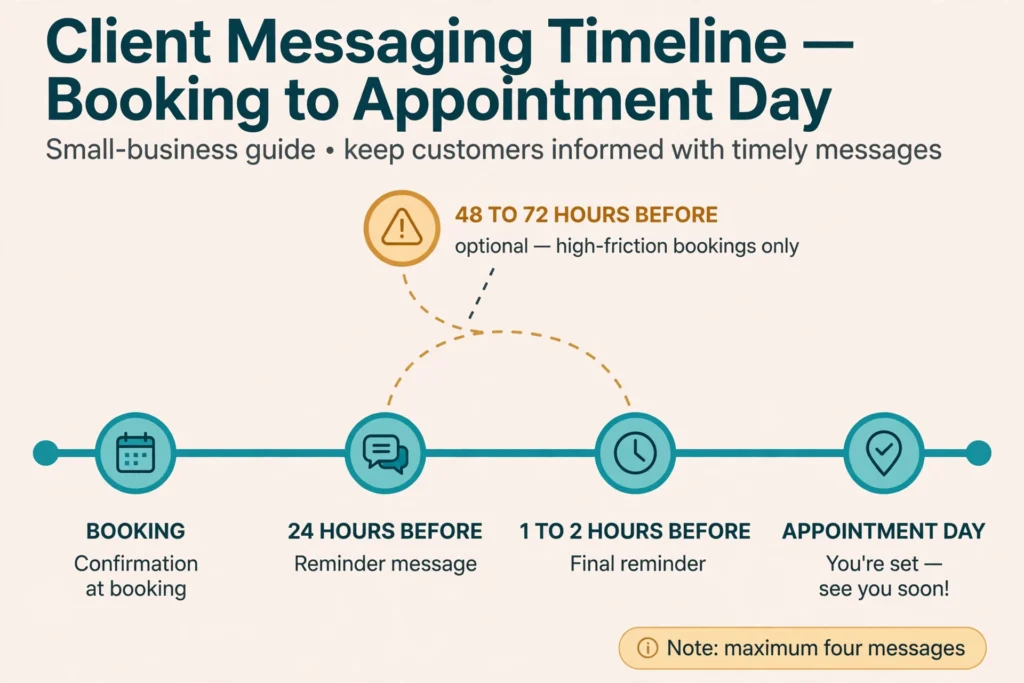
How many reminders, and when? When to send appointment reminders is the question every guide answers slightly differently, and the guides ranking for this topic mostly agree on the shape — a confirmation at booking, a reminder a day or two before, a same-day nudge — and they disagree on the count, from two messages to four. This guide recommends three messages as the default, with a fourth only for bookings where missing the appointment is expensive for both sides. That recommendation folds in what the newer guides say: three is the usual pattern, a 48–72 hour early reminder fits only high-friction bookings, and the total should be capped at four.
Message 1 — confirmation, at booking. This is not a reminder. It is the proof the booking exists, and it goes out the moment the booking is made. It must contain: the customer’s name, the service, the date and time with the time zone, the location or meeting link, and the reschedule or cancel link. In the salon example, Sara books on Sunday and gets this message at once: haircut, Tuesday 10am, the salon’s address, and the link to move or cancel it. If a customer ever has to ask “did it actually book?”, this message has failed, and the fix is in the message, not in the customer.
Message 2 — reminder, 24 hours before. One day before the appointment, the customer gets a short reminder with the same facts, plus the same reschedule link. This is the message that does most of the work: it catches the customer who forgot, and it catches the customer who needs to move the booking while there is still time to fill the slot. For Sara, this arrives Monday at 10am. It should read like a reminder, not like a marketing email — one short message, the facts, the link, nothing else.
Message 3 — nudge, 1–2 hours before. On the day, a final short nudge, one or two hours before the appointment. Same facts, shorter. This one catches the customer who is out and about and has lost track of the day. For Sara, this arrives Tuesday at 8:30am. It is the last automated message before the appointment, and after it, the system goes quiet until the appointment is over. If the customer has not replied by now, the next step is a human, not a fourth automated message — that rule is in the no-reply section below.
The optional fourth message — 48–72 hours before, high-friction bookings only. Some bookings are expensive to miss: a long appointment that blocks half a day, a first visit that needs preparation, a booking that required the customer to arrange childcare or time off work. For those, add one early reminder two or three days before, so the customer can move it while the slot is still fillable. For an ordinary haircut, a routine check-up, or a short home-service visit, do not add it. Four messages for a thirty-minute booking is not thorough. It is nagging, and nagging trains customers to ignore all four.
Two rules govern the whole sequence. First, cap it at four messages, including the confirmation. If your sequence needs five messages to work, the problem is not the count. The problem is that the booking was never confirmed properly, or the messages do not contain the facts the customer needs, and adding more messages will not fix either. Second, every message must be able to stand alone. A customer who only reads the Tuesday 8:30am nudge must still find the time, the place, and the reschedule link in that message. Never write a reminder that says “see your confirmation email for details,” because the customer who needs the reminder is the customer who cannot find the confirmation email.
Timing varies by industry, and the pattern above is the small-business default, not a law. Clinics often use 72 hours + 24 hours + 2 hours, because a missed appointment blocks a scarce slot; professional services use 48 hours + 2 hours; fitness studios use 24 hours + 2 hours; home services use 48 hours + a morning-of message + an “on the way” SMS; coaching uses 24 hours + 1 hour. This guide uses 1–2 hours for the last nudge instead of 10 minutes because it is written for in-person small businesses — a salon, a clinic, a home visit — where the customer needs travel time, not for virtual consults where ten minutes is enough. And two details the ranking guides mention that most small businesses miss: quiet hours, and time zones. If a reminder would land overnight — an 8am appointment with a 3-hour reminder at 5am — shift it to 7am or send email instead of SMS, because a 5am text is a complaint, not a reminder. And store every booking in UTC and render it in the customer’s own time zone, printing the zone in the message, and watch for daylight-saving shifts — a reminder that says the right time in the wrong zone sends the customer to the wrong hour.
What each message must contain, every time: name, service, date and time with the time zone, location or meeting link, reschedule or cancel link. These are dynamic fields — {{first_name}}, {{service}}, {{date}}, {{time}}, {{location}}, {{reschedule_link}} — filled from the booking record, never typed by hand, so a message can never carry another customer’s details. The confirmation should also carry an add-to-calendar link, so the appointment lands in the customer’s own diary, and the late-cancel policy stated plainly — not buried in the last-minute nudge, where the customer reads it too late. The 24-hour reminder should carry any prep for a first visit — what to bring, any pre-visit form to fill in — because that is the message the customer reads while they still have time to prepare. For home services, the day-of message can be an “on the way” SMS instead of a plain nudge, and a “running late?” reply from the customer goes straight to a human, never to another automated message. What no reminder should contain: a discount, a promotion, or a request for anything else. The reminder has one job, which is to get the customer to the right place at the right time. Anything else in the message is a distraction from that job, and it teaches the customer that your reminders are marketing, which teaches them to ignore the next one.
Copy-Paste Message Templates
Competitors give example messages, and this guide should too. Copy these four, change only the facts in the brackets, and keep the shape. They use the salon example — Sara, haircut, Tuesday 10am — and every one of them carries the dynamic fields from the section above, so nothing is typed by hand.
Template 1 — confirmation email, sent at booking.
Subject: You’re booked — Haircut, Tuesday 10am
Hi Sara,
You’re booked in for a haircut on Tuesday at 10:00am (your local time) at [salon address]. Your stylist is [stylist name].
Need to move or cancel? Use this link: [reschedule link]. Add it to your calendar here: [add to calendar link].
See you Tuesday — [salon name].
Template 2 — reminder SMS, 24 hours before.
Hi Sara, a reminder: your haircut is tomorrow, Tuesday at 10:00am at [salon address]. Need to move it? [reschedule link]. Reply to this message if anything has changed — a person will read it.
Template 3 — nudge SMS, 1–2 hours before.
Hi Sara, your haircut is today at 10:00am at [salon address]. See you soon — [salon name]. Running late? Just reply to this message.
Template 4 — post-appointment follow-up, Tuesday afternoon.
Hi Sara, thank you for coming in today. Your receipt is attached, and [stylist name] noted [one line from the visit]. Would you like to book your next haircut? [booking link]. Thank you — [salon name].
One rule for all four: change the facts, never the shape. The name, the service, the time, the place and the link must always be in the same place, so a customer who has seen one message can find the facts in the next one without reading it twice. And never send template 2 or 3 to a customer who has already rescheduled or cancelled — that is the stop rule, and it is the next section.
The Stop Rule
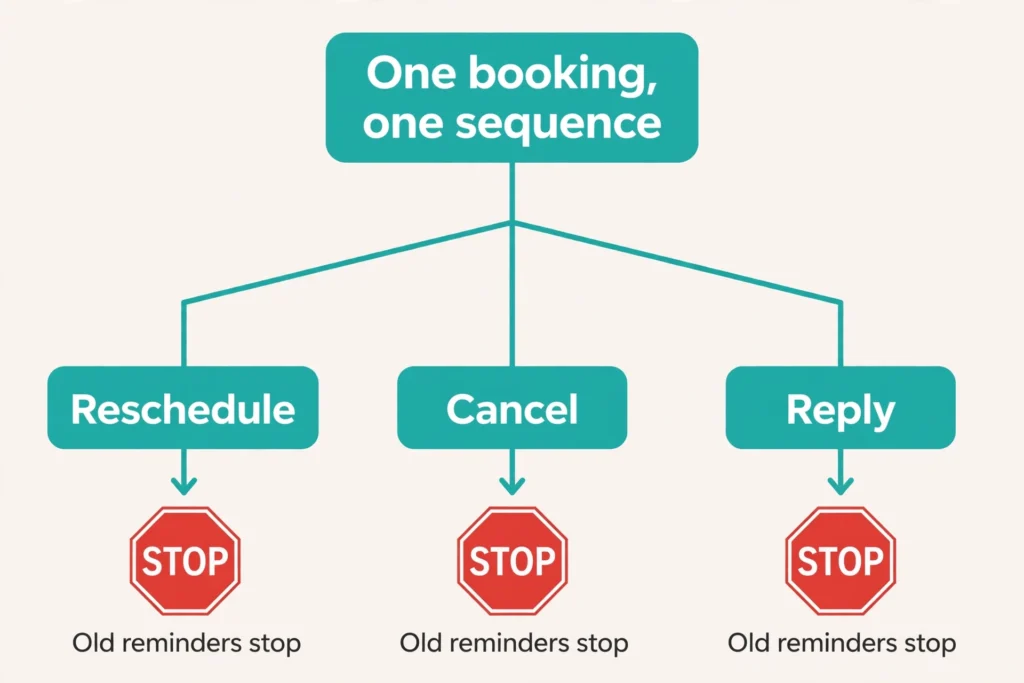
The stop rule is the most important section in this guide, and the one competitors treat most briefly: a rescheduled or cancelled booking must stop all of its downstream reminders. The same way a paid invoice stops reminders in Automate Invoice and Payment Reminders for a Small Business, a moved appointment must stop the old appointment’s reminders. That is how you stop appointment reminders after reschedule — not by deleting them by hand, but by the system cancelling the old sequence the moment the booking moves. If it does not, the customer gets reminded about an appointment they no longer have, and the business looks careless in exactly the moment it should look organised.
Here is how the rule works, in plain language, and how to test that it works before you trust it.
Reschedule stops the old sequence and starts a new one. When Sara moves her haircut from Tuesday 10am to Thursday 2pm, three things must happen at once. First, Tuesday’s reminders stop — the Monday reminder and the Tuesday nudge must never fire. Second, the Tuesday slot opens again, so someone else can book it. Third, Thursday’s booking starts its own fresh sequence: a new confirmation for Thursday 2pm, a new reminder 24 hours before, a new nudge on the day. The customer gets one sequence for the booking they actually have, and no sequence for the booking they no longer have. If your tool cannot do all three, it does not really support rescheduling. It supports changing a date on a record while the old reminders keep running, and you will find out about that from an annoyed customer, not from the tool.
Cancel stops everything. When a customer cancels, every downstream message stops — reminders, nudges, and the post-appointment follow-up. The only message that may follow a cancellation is a single confirmation that the booking is cancelled, sent once, so the customer knows it worked. After that, silence. A cancelled customer who keeps receiving reminders is a customer who will not book again, and the business has spent its own automation budget on driving a customer away. When a slot frees up, offer it to the waitlist — one message to the first person waiting, not a blast to everyone — and if they take it, that booking starts its own fresh sequence.
A reply pauses the sequence and goes to a human. If a customer replies to a reminder — “I need to move it,” “I’m running late,” “can I bring my daughter too?” — the automated sequence must pause, and the reply must go to a person. The workflow does not answer it. It does not send another reminder on top of it. It holds, and a human reads it and decides. This is the same guardrail as the human-in-the-loop rule in Topic 14: the workflow prepares the work, and a person handles the case that needs judgment. A customer who wrote back has already told you they need a person. Answering them with another automated message tells them nobody is listening.
The dedupe guard. A reschedule must never fire duplicate messages — the old sequence and the new sequence sending the same reminder twice. The fix is a single rule in the workflow: one booking, one active sequence. When a booking is rescheduled, the old sequence is cancelled before the new one is created, not after. When you test this, test it with your own booking: book a test appointment, move it, and count the messages you receive. If you receive a reminder for the old time and a reminder for the new time, the guard is missing, and you must fix it before a real customer gets both.
This is also why the booking tool’s own reschedule test, in the earlier section, matters so much. Many tools handle the calendar correctly and the messages wrongly: the diary shows Thursday, and the reminders still say Tuesday. That is not a small bug. It is the system telling two different stories, and the customer will believe the message, not the diary. Test the messages, not just the calendar, and do not go live until the messages are right.
No-Shows and No Replies
Two failures need a human answer, and neither of them is fixed by sending more automated messages.
When nobody replies to the reminder. The 24-hour reminder has gone out, and the customer has not replied. The next step is not another automated text. It is a human call, that afternoon, from a person who can have a real conversation: confirm the time, ask if anything needs to move, and find out whether the customer is still coming. That call is the one step in this system that no automation should replace, because the question it answers — “are you still coming, and is anything in the way?” — is a question only a person can ask well, and the answer changes what the business does next. If the customer confirms, the sequence continues to the same-day nudge as normal. If the customer needs to move, the stop rule takes over and the booking is rescheduled properly. If the customer cannot be reached, the booking stays as it is, the same-day nudge still goes out, and the business prepares for the possibility of an empty slot. What the business must not do is send a second, third, and fourth automated message to a customer who has already shown, by not replying, that the messages are not reaching them. More messages to an unreached customer do not reach the customer. They only make the business look desperate.
When the customer does not show up. The appointment time passes, and Sara is not there. The system does not keep messaging her. One human follow-up goes out, once, from a person: a short no-show follow-up message saying the salon missed her, asking if everything is all right, and offering to rebook. One rebook offer, not a series. If she replies and rebooks, the new booking starts its own sequence, and the old one is closed. If she does not reply, the business stops. It does not send a second reminder, a third reminder, or a “we noticed you missed your appointment” sequence. A no-show is often a customer with a reason — an emergency, a misunderstanding about the time, a bad day — and a business that keeps messaging them after the fact is not following up. It is punishing them, and it will not see them again.
There is one more protection in this section, and it is the weekly check that catches silent failure. Once a week, one named person compares two numbers: the bookings that were made, and the reminders that actually went out. If ten bookings were made and nine reminder sequences ran, something failed silently, and the missing one must be found before another week of bookings goes missing. This is the same five-minute check from Topic 14, and it is the safety net for the whole system. No tool can promise it will never fail silently, because the failure is usually in the connection to another app, not in the workflow itself. The weekly check is what makes the failure visible, and it only works if one named person owns it, with a named backup for holidays. Put it in that person’s calendar as a recurring task, and make sure the check includes one real look at the messages themselves: open one reminder from the past week and read it as if you were the customer. Does it have the right time, the right place, and the right link? A check that only counts messages will miss the message with the wrong time in it, and the wrong time is the failure that costs a customer.
Measure It Weekly: Show Rate, Confirmation Rate, Reschedule Rate
Counting reminders sent is not measuring the system. Measure three rates, once a week, from the same numbers you already have in the booking tool:
- Show rate — appointments attended divided by appointments scheduled. If ten people booked and eight showed up, the show rate is 8 out of 10. This is the number the whole system exists to move.
- Confirmation rate — bookings confirmed divided by bookings made. A low confirmation rate means the confirmation message is failing, not the reminders — fix the confirmation first.
- Reschedule rate — bookings moved divided by bookings made. A high reschedule rate is not a failure on its own, but if reschedules keep producing reminders for the old time, the stop rule is broken, and the reschedule rate will tell you before a customer does.
Check them weekly, not monthly, because a weekly check catches a broken sequence after seven days of damage, not thirty. Write the three numbers down in the same place every week — a line in a spreadsheet is enough — so you can see whether the system is getting better or worse, instead of guessing from memory. And do not compare your rates with anyone else’s: a salon, a clinic, and a home service will never have the same show rate, and a percentage from another guide is not your target. Your target is your own number from last week, beaten by a little, every week.
After the Appointment
The appointment is over, and the system has one more job, not five. One follow-up goes out after the appointment — a receipt, any notes from the visit, and a review request if that fits your business — and then the sequence ends. In the salon example, Sara gets one message on Tuesday afternoon: her receipt, a note about the cut, and a thank-you. If the salon asks for a review, the request is in that same message, once, not in a separate message the next day, and not in a series of messages over the following week. A customer who has just had a good appointment is at their most willing to come back. A customer who is messaged four times after it is at their most willing to unsubscribe.
That follow-up is also where layer 2 earns its place, as described earlier: the AI step drafts it, and a human approves it before it is sent. The draft must repeat back only what actually happened — the service, the stylist, the notes from the visit — and it must never invent a detail, promise a result, or offer a discount nobody approved. If the draft gets a detail wrong, the human catches it in thirty seconds. If the draft is sent automatically and gets a detail wrong, the customer receives a message about an appointment they did not have, from a business that does not seem to know who they are.
After that one message, the sequence stops, and the longer relationship begins. Turning a first visit into a regular customer — remembering what they like, checking in at the right interval, welcoming them back — is a different workflow with a different shape, and it is covered in How to Automate Customer Onboarding for a Small Business (Without Losing the Personal Touch). Do not try to build the booking system and the onboarding system in the same afternoon. Finish one, let it run for two weeks, and then build the next. A business that finishes its booking system properly has already removed the empty chair. The onboarding system is what fills the chair again next month.
Test Before Going Live
Testing is not a formality. It is the step that separates a system that works from a system that worked once, in a demo, and then failed on the first real customer. Test with real test bookings, not with the sample data the tool offers you, because sample data is always clean and your customers’ data never is. The full testing method is in How to Test an Automation Before It Goes Live — this is the appointment version of it, and it takes an afternoon.
- Book a real test appointment. Book an appointment yourself, exactly as a customer would, with your own name and a real phone number and email. Check that the confirmation arrives at once, with the right service, date, time, location, and reschedule link. Then book a second one with a different service, and check that it creates a second booking and does not overwrite the first.
- Check the reminder timing. Shorten the timing for the test, or wait for the real timing, and confirm each message arrives when it should, with the right facts in it. Read every message as if you were the customer. Does the 24-hour reminder say the right day? Does the same-day nudge say the right time, with the time zone? A reminder with the wrong time is worse than no reminder, because the customer will trust it.
- Reschedule the test booking. Move it to another day, and count the messages you receive. You should get a new confirmation for the new time, and no reminder for the old time. If a reminder for the old time arrives, the stop rule is broken, and you must fix it before a real customer gets both messages.
- Cancel a test booking. Cancel it, and confirm that everything stops except the single cancellation confirmation. If a reminder still arrives after the cancellation, the system is not finished, however good the rest of it looks.
- Reply to a reminder. Reply to a test reminder as a customer would — “I need to move it” — and confirm that the automated sequence pauses and the reply reaches a person. If another automated message arrives on top of your reply, the pause is missing.
- Break it on purpose once. Book with a blank field, and again with an unusually long note. Check that the booking is still saved and the confirmation still arrives. A system that stops on a blank field will stop on the first real customer who forgets to fill one in.
- Check the failure case. Switch the workflow off, make a test booking, and confirm that you know how to spot the missing booking and add it by hand. Then switch it back on. You need to know, before you need it, what a missed run looks like and how to recover from it.
- Let it run for a few days. Watch the first real bookings come through, and check each one against the diary. If three real bookings in a row work perfectly — confirmation, reminders, no duplicates — the system is ready to be trusted. If one fails, find out why before you stop watching.
- Check deliverability before you trust the email. Before going live, confirm your sender authentication is set up — SPF, DKIM, and DMARC on your sending domain — or your confirmations and reminders will land in spam, and no reminder sequence can fix a message the customer never sees. Send a test confirmation to a personal inbox and check which folder it lands in; if it is spam, fix the authentication first, not the message text.
Keep a short note of what you tested and when — a few lines in a document is enough. In a month’s time, when something changes in one of your apps and the system stops, that note is what lets you work out whether the problem is in your system or in the app that changed.
What to Automate Second
Once this system has run cleanly for two weeks — bookings saved every time, confirmations arriving, reminders on time, reschedules stopping the old sequence, the weekly check done — you have earned the right to pick a second task. Use the same discipline: one task at a time, mapped on paper, built in two layers, tested with real bookings, checked weekly, with a human approving anything a customer sees.
Good second tasks are usually close relatives of the first. If your first system handled bookings and reminders, your second might be the follow-up for customers who have not booked again in three months — a single check-in, from a person, offering the next slot. Or it might be the onboarding workflow for a first-time customer, which is covered in How to Automate Customer Onboarding for a Small Business (Without Losing the Personal Touch). Or it might be the invoice reminders for the same customers, which is covered in Automate Invoice and Payment Reminders for a Small Business, where the same stop rule already exists in a different shape: a paid invoice stops its reminders, the way a cancelled booking stops its own. Each of these reuses something you already built: the same booking record, the same customer details, the same message habits. That reuse is what makes the second system faster to build than the first, and it is how a small business builds a system instead of a collection of disconnected automations.
Resist the temptation to automate everything at once after the first success. The first success proves that the method works. It does not prove that every task in the business is ready. After three or four systems built this way, you will have something more valuable than any single automation — a business where the routine work happens reliably, the owner spends their time on customers instead of chasing bookings, and nobody has to remember the boring jobs, because the system remembers them.
Checklist: Your Booking System in an Afternoon
Use this list in order, and do not skip a step because it looks obvious. The obvious steps are the ones that get skipped and then cause the failure.
- Map the six steps on paper for your own business: booking, confirmation, reminders, reschedule/cancel stop, no-show follow-up, post-appointment follow-up — using one real example, the way Sara’s haircut is used in this guide.
- Check the booking tool you already use against the four questions: does it hold a real slot, confirm automatically, let you control reminder timing, and stop reminders when a booking moves?
- Add a connector only for a step your tool cannot do. Choose it from Make vs Zapier vs n8n for a Small Business: An Honest Comparison, and check the tool’s own pricing page before paying.
- Build layer 1 only: booking → confirmation → reminders → stop rule. No AI yet. Every message must stand alone, with name, service, date and time with time zone, location or meeting link, and reschedule or cancel link.
- Set the sequence to three messages by default — confirmation at booking, 24 hours before, 1–2 hours before — and add the 48–72 hour early reminder only for high-friction bookings. Cap the sequence at four. This is the sequence that makes the whole system work: when you automate appointment booking reminders small business customers rely on, the count is the promise — three messages, each standing alone, and no more.
- Build the stop rule first, not last: reschedule stops the old sequence and starts a new one, cancel stops everything except one cancellation confirmation, a reply pauses the sequence and goes to a human, and one booking has one active sequence.
- Test with real test bookings: book, check the confirmation, reschedule and count the messages, cancel and confirm silence, reply and confirm a human gets it, break it on purpose with a blank field.
- Add layer 2 only after two clean weeks: one AI step, drafting the post-appointment follow-up, held for human approval before sending. Never let it write confirmations or reminders on its own.
- Put the weekly five-minute check in one named person’s calendar, with a named backup: bookings made against reminders sent, and one real message read as if you were the customer.
- Only after two clean weeks, pick the second task from your shortlist, using the same method.
7 Mistakes That Break a Booking System
1. Reminding without confirming. If the booking itself was never confirmed with the full facts, the reminders are built on sand. The customer who is not sure the booking exists will not trust the reminder either. Confirm first, remind second.
2. Sending reminders the customer cannot act on. A reminder without a reschedule link, without the location, or without the time zone is a message that creates a phone call. Every message must stand alone with everything the customer needs.
3. Letting a rescheduled booking keep its old reminders. This is the failure customers remember. One booking, one active sequence — test it with your own booking before a real customer discovers it for you.
4. Chasing a no-show with more automated messages. One human follow-up, one rebook offer, then stop. A workflow that keeps messaging a no-show is not persistent. It is rude, and it loses the customer twice.
5. Answering a customer’s reply with another automated message. A customer who wrote back needs a person. If the sequence keeps going on top of their reply, the business has told them nobody is listening.
6. Adding AI before the plain system works. If layer 1 does not confirm and remind reliably, layer 2 will draft follow-ups for appointments the system has already mishandled. Simple first, clever second — and never let AI write a confirmation or a reminder on its own.
7. Having no owner and no weekly check. A system that nobody checks will fail silently, and silent failure is the only failure that loses bookings without anyone noticing until the chair is already empty.
FAQs
Do I need to know any code at all?
No. This system is built with the booking tool you already use and, only where that tool has a gap, a no-code connector such as Zapier, Make, or n8n, which works by picking a trigger and adding actions as boxes on a canvas. What you do need is a clear map of what should happen, in what order, and what to do when something goes wrong — and this guide walks through that map step by step. If you can explain your booking process to a colleague in one sentence, you can build it.
Email, SMS or WhatsApp — which channel for which message?
Use email for the confirmation, because it is the message the customer will search for later and it can hold all the details. Use SMS or a messaging app for the short reminders, because those are the messages the customer needs to see quickly, on the day. WhatsApp fits the same role as SMS where your customers already use it, but only if the customer agreed to be messaged there. Keep the sender consistent across all three messages, and keep the reschedule link in the same place every time.
Can I do this with just Google Calendar, no booking tool?
Yes — trigger the reminders from calendar events, and keep a sheet with one row per booking and a Status column: confirmed, reminded, cancelled. It works, but you lose the structured details a booking tool keeps for you — the service, the provider, the reschedule link — so the messages have to be built from the sheet, and a booking that changes in the calendar must be changed in the sheet by hand. Use it as a start, not as the final system.
SMS or WhatsApp — which is better for no-shows?
It depends on your customers and your region. Email at 24 hours plus WhatsApp or SMS at 1–2 hours is the workable pattern for most small businesses, because the email carries the details and the short message carries the urgency. Test the last-nudge channel for two weeks — send it by SMS one week and by WhatsApp the next — and keep whichever one your customers actually reply to. The right answer is the channel your customers read, not the one a guide recommends.
What about group classes or multi-person bookings?
Use the same cadence — confirmation, 24-hour reminder, same-day nudge — but separate logic per event type: the host gets a management link with the full attendee list, and each guest gets their own reminder with their own name and the same reschedule link. A group booking is several bookings sharing one slot, and if one guest cancels, only their reminders stop — the rest of the group keeps theirs.
How many reminders are too many?
Three messages is the default: confirmation at booking, a reminder 24 hours before, and a nudge 1–2 hours before. Add a fourth — an early reminder 48–72 hours before — only for high-friction bookings, where missing the appointment is expensive for both sides, such as a long appointment or a first visit that needs preparation. Cap the sequence at four. If five messages seem necessary, the problem is in the confirmation or in the messages themselves, and more messages will not fix it.
What if a customer reschedules?
The old sequence stops and a new one starts. The rescheduled booking gets a new confirmation, a new 24-hour reminder, and a new same-day nudge, and the old booking’s reminders never fire. The freed slot opens again for someone else. Test this with your own booking before you trust it: move a test appointment and count the messages. If you receive a reminder for the old time, the stop rule is broken.
What if nobody replies to the reminder?
Do not send another automated message. A human calls the customer that afternoon, confirms the time, and asks if anything needs to move. If the customer confirms, the sequence continues as normal. If they need to move, the stop rule takes over. If they cannot be reached, the booking stays as it is and the same-day nudge still goes out. No reply to a message is information — it tells you the messages may not be reaching that customer — and more messages to an unreached customer do not reach them.
What if a customer never shows up?
One human follow-up, once, from a person: a short message saying you missed them, asking if everything is all right, and offering to rebook. One rebook offer, not a series. If they reply and rebook, the new booking starts its own sequence. If they do not reply, stop. Do not send further reminders or a sequence of “we missed you” messages. A no-show is often a customer with a reason, and a business that keeps messaging them after the fact will not see them again.
When should a human take over instead of automating?
Whenever the right answer needs judgment: a customer who replies to a reminder, a customer who needs to move a booking, a no-show, a complaint, or any message that moves money or makes a promise about money. Automate the booking, the confirmation, the reminders, and the drafting of the follow-up — and let a person decide, approve, and send whenever a customer has spoken back. If a case cannot be handled by a fixed rule, it is not ready to automate yet.
Conclusion
A booking system is not a reminder tool. It is the whole journey from the moment a customer decides to book to the moment after they leave: the booking itself, the confirmation that proves it exists, three reminders that each stand alone, a stop rule that protects the customer who moves or cancels, one human call when nobody replies, one human follow-up when nobody shows up, and one message after the appointment — and then silence. Built in two layers, tested with real bookings, and checked once a week by a named person, it removes the empty chair without removing the human from the business.
That is how you automate appointment booking reminders small business customers will actually trust: not with more messages, but with fewer, better ones — each carrying the facts, each stoppable, each checked by a person. Build layer 1 this afternoon, let it run cleanly for two weeks, and then add the one AI step that earns its place. After that, build the next system the same way. After three or four, you will not have a collection of clever tools. You will have a business where the bookings happen on their own, and your time goes back to the customers.
For the bigger picture, return to 25 AI Automation Examples for Businesses in 2026. For the two-layer method this system is built on, see No-Code Automation for Small Business: Build Your First Workflow Without Writing Code. For the longer relationship after the appointment, see How to Automate Customer Onboarding for a Small Business (Without Losing the Personal Touch).

Flowmez publishes practical AI workflow guides, tested steps and honest tool reviews to help small businesses save time.