

Businesses are increasingly looking for practical ways to use AI without turning every process into an experimental technology project. The challenge is knowing where AI actually helps and where ordinary automation is enough.
The most useful AI automation examples are not simply tasks where an AI tool generates something. They connect AI processing to a repeatable business workflow: information enters the process, AI interprets or transforms it, predefined rules determine what happens next, and an automation layer moves the result into the right system or person.
This guide covers 25 practical examples across sales, marketing, customer service, finance, administration, and internal operations. Each example explains the workflow, who it suits, its implementation difficulty, and the main risks to consider.
The goal is not to automate everything. It is to identify processes where AI can handle interpretation, classification, extraction, summarization, or generation while predictable actions remain controlled by ordinary automation.
What Is AI Automation?
AI automation combines AI capabilities with an automated business process.
A simple way to think about it is:
Trigger → AI processing → Decision/output → Automation action → Human review
For example, a new lead might enter through a website form. AI can analyze the approved information and classify the lead against predefined criteria. The automation layer can then update the CRM and create a sales task for review.
The important distinction is that AI performs the cognitive part of the process, while the automation layer connects that result to business systems and actions.
Other examples include:
- A received email is classified by intent and routed to the appropriate workflow.
- An invoice is processed to extract relevant fields before validation and approval.
- Meeting notes are analyzed to identify potential action items that can become draft tasks.
AI is therefore not necessarily the entire automation. It is one component inside a larger workflow.
AI Automation vs Traditional Automation
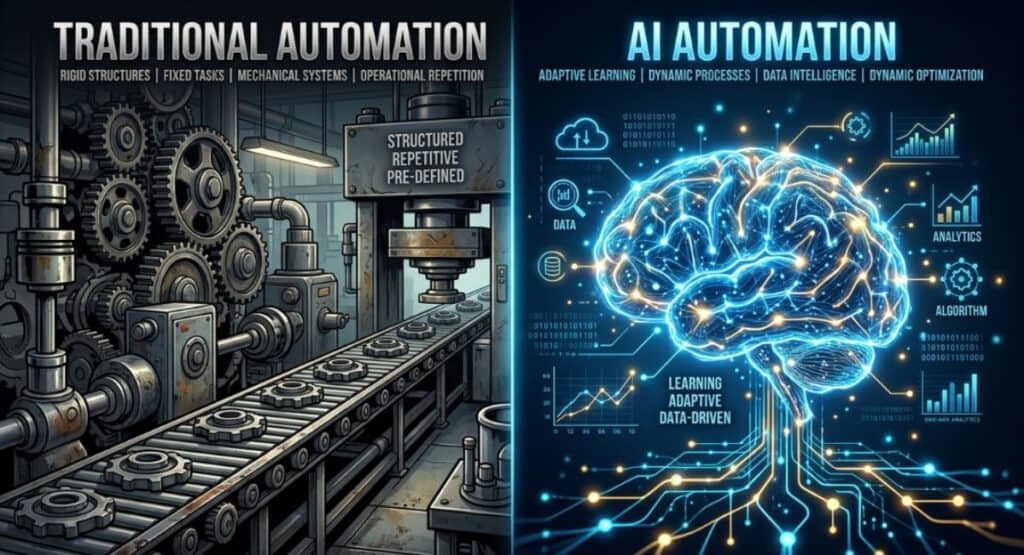
Traditional automation works best when the rules are predictable.
For example, a rule might say: when a form is submitted, add the contact to the CRM and notify the sales team.
AI-assisted automation becomes useful when the process contains information that is harder to handle with fixed rules, such as natural-language messages, documents, transcripts, or customer feedback.
| Area | Traditional automation | AI-assisted automation |
| Logic | Predefined rules | AI interpretation plus rules |
| Best for | Predictable processes | Processes involving unstructured information |
| Input | Structured fields | Text, documents, messages, transcripts, structured data |
| Example | Move a form submission into a CRM | Classify the form information before routing it |
| Predictability | Usually high when rules are correct | Depends partly on AI output |
| Human review | Often limited | More useful when interpretation affects an important action |
The two approaches can also work together. A workflow may use AI to classify an incoming message and then use ordinary automation to route the message according to predefined rules.
AI Workflow vs AI Agent
An AI workflow is a defined sequence of steps. The business generally knows what should happen after each stage.
An AI agent has more autonomy. Depending on its design and controls, it may determine which actions to take or which steps to pursue within a broader objective.
| Characteristic | AI workflow | AI agent |
| Structure | Defined sequence | More adaptive |
| Decision-making | Usually predefined | Can involve autonomous decisions |
| Predictability | Generally higher | Can vary based on context |
| Best suited to | Repeatable business processes | More open-ended tasks |
| Control | Easier to constrain | Requires stronger controls |
| Human oversight | Added where needed | Especially important for consequential actions |
For many business processes, a workflow is a sensible starting point because the inputs, outputs, and actions can be clearly defined.
An agent may be useful when a process requires more flexible reasoning, but greater autonomy also means more testing, monitoring, permissions, and safeguards may be necessary.
How to Identify a Good AI Automation Opportunity
Not every repetitive task needs AI. A good automation opportunity usually has several characteristics:
- It happens frequently.
- Employees spend meaningful manual effort on it.
- Inputs and outputs can be clearly defined.
- Information needs to be classified, extracted, summarized, interpreted, or generated.
- The result can be checked for errors.
- The business outcome can be measured.
- Appropriate human approval can be retained when the consequences of an error are significant.
Before automating, look at the process itself rather than starting with a particular AI tool.
Ask:
- What happens repeatedly?
- Where does someone have to read, interpret, classify, or copy information?
- Which steps are deterministic?
- Which steps require judgment?
- What happens when the process fails?
- What should require human approval?
The objective is to find the smallest part of the process where AI provides a genuine advantage.
25 AI Automation Examples for Businesses

The examples below are organized by department so you can see how AI-assisted workflows can fit into different areas of a business.
| Example | Department | Difficulty | Primary benefit |
| AI Lead Qualification | Sales | Medium | Better lead handling |
| Automated Lead Research and Enrichment | Sales | Medium | More useful lead information |
| Personalized Sales Follow-Up | Sales | Medium | More relevant outreach |
| CRM Data Entry and Call-Note Automation | Sales | Easy | Less manual data entry |
| Lead Routing and Sales Task Creation | Sales | Easy | Faster workflow coordination |
| AI Content Brief Generation | Marketing | Easy | Faster content planning |
| AI Content Repurposing | Marketing | Easy | More efficient content production |
| Social Media Content Workflows | Marketing | Medium | Streamlined publishing |
| Customer Review and Feedback Analysis | Marketing | Medium | Better feedback visibility |
| Email Campaign Personalization | Marketing | Medium | More relevant communication |
| Support Ticket Classification | Customer Service | Easy | Better ticket routing |
| AI-Assisted Customer Support Responses | Customer Service | Medium | Faster response drafting |
| FAQ and Knowledge-Base Routing | Customer Service | Medium | Faster information retrieval |
| Customer Sentiment and Escalation Detection | Customer Service | Medium | Earlier issue identification |
| Customer Feedback Summarization | Customer Service | Easy | Easier feedback review |
| Invoice Data Extraction | Finance/Admin | Medium | Less manual invoice entry |
| Expense Categorization | Finance/Admin | Easy | Consistent expense classification |
| Document Data Extraction | Finance/Admin | Medium | Structured information capture |
| Inbox and Email Triage | Finance/Admin | Easy | Better message prioritization |
| Meeting-to-Task Automation | Finance/Admin | Easy | Better follow-through |
| Automated Weekly Reporting | Operations | Medium | Easier reporting |
| Internal Knowledge Search | Operations | Medium | Faster information retrieval |
| Employee Onboarding Workflows | Operations | Medium | Better process coordination |
| Inventory and Demand Monitoring | Operations | Advanced | Better operational visibility |
| Workflow Exception Detection and Escalation | Operations | Advanced | Earlier identification of unusual conditions |
Sales and Lead Generation AI Automation Examples

1. AI Lead Qualification
What it does:
AI analyzes approved lead information and classifies prospects against predefined qualification criteria. The result can help sales teams distinguish between different lead categories before follow-up.
Workflow:
New lead submitted → AI analyzes approved lead information → Lead is classified against predefined criteria → CRM is updated and a sales task is created → Salesperson reviews the classification
Best for:
B2B companies, agencies, and sales teams receiving leads through forms, campaigns, referrals, or other structured channels.
Difficulty:
Medium
Why it matters:
Sales teams can use the workflow to organize incoming opportunities without manually reviewing every field in exactly the same way.
Watch out for:
AI classification is only as reliable as the information and criteria provided. Qualification rules should be explicit, and unusual or borderline leads should remain available for human review.
2. Automated Lead Research and Enrichment
What it does:
This workflow gathers approved information about a new prospect, summarizes relevant details, and places the resulting information into a designated sales record or workspace.
Workflow:
New lead submitted → AI processes approved prospect information → Relevant details are structured or summarized → CRM record is enriched → Salesperson reviews important information
Best for:
B2B sales teams and agencies that need consistent background information before contacting prospects.
Difficulty:
Medium
Why it matters:
It can reduce repetitive research and give salespeople a more consistent starting point for prospect conversations.
Watch out for:
Information can be incomplete, outdated, or incorrectly interpreted. Businesses should define which sources and fields are acceptable rather than treating generated enrichment as automatically accurate.
3. Personalized Sales Follow-Up
What it does:
AI can use approved customer and interaction information to prepare a draft follow-up message aligned with a predefined sales context, tone, or offer.
Workflow:
Sales interaction completed → AI reviews approved context → Follow-up draft is generated → Message enters an approval or sending workflow → Salesperson reviews and sends when appropriate
Best for:
Sales teams handling recurring follow-up communication with prospects or customers.
Difficulty:
Medium
Why it matters:
The workflow can make repetitive drafting easier while preserving a consistent communication process.
Watch out for:
Personalization should be based on relevant, approved information. Customer-facing messages involving sensitive details, unusual circumstances, or important commitments should receive appropriate review.
4. CRM Data Entry and Call-Note Automation
What it does:
Meeting transcripts or call notes can be processed to identify relevant information and prepare structured CRM updates.
Workflow:
Sales call ends → AI extracts relevant notes and information → Structured CRM fields or summary are prepared → CRM record is updated or queued for update → Salesperson verifies important details
Best for:
Sales teams that regularly document calls, meetings, next steps, or customer information.
Difficulty:
Easy
Why it matters:
It reduces repetitive copying and formatting while helping maintain more consistent records.
Watch out for:
Transcripts can contain errors or ambiguous statements. Important customer commitments and sales information should be checked before becoming an official record.
5. Lead Routing and Sales Task Creation
What it does:
A workflow can classify an incoming lead and use predefined rules to determine which team, person, or queue should receive it.
Workflow:
Lead submitted → AI processes relevant lead information → Routing category is determined → CRM task or assignment is created → Sales team reviews exceptions
Best for:
Organizations with multiple sales representatives, territories, products, or lead categories.
Difficulty:
Easy
Why it matters:
Clear routing rules can reduce manual coordination and make ownership of new opportunities easier to manage.
Watch out for:
Incorrect classification can send a lead to the wrong person or queue. Routing criteria should be explicit and exceptions should have a defined escalation path.
Marketing AI Automation Examples
6. AI Content Brief Generation
What it does:
AI can turn approved research, search information, audience requirements, and content objectives into a structured content brief.
Workflow:
New content request → AI organizes approved research and requirements → Brief is generated → Brief enters the content workflow → Editor or strategist reviews it
Best for:
Content teams, agencies, SEO teams, and businesses publishing educational resources.
Difficulty:
Easy
Why it matters:
A structured brief can help writers start with clearer objectives, audience needs, topics, and content requirements.
Watch out for:
AI-generated briefs still need editorial review. Search intent, factual claims, originality, brand voice, and important source information should be checked before writing begins.
7. AI Content Repurposing
What it does:
Existing approved content can be transformed into other formats, such as summaries, social posts, email drafts, or short-form content.
Workflow:
Approved source content available → AI extracts relevant ideas → New content formats are generated → Drafts enter the publishing workflow → Human reviews accuracy, originality, and brand fit
Best for:
Marketing teams and small businesses that already produce substantial original content.
Difficulty:
Easy
Why it matters:
Repurposing can make existing material easier to adapt for different communication channels without starting from zero each time.
Watch out for:
Repurposed content should not simply repeat the source mechanically. Each format needs review for context, accuracy, originality, and suitability for its intended audience.
8. Social Media Content Workflows
What it does:
AI can help transform approved marketing material into platform-specific social content, while the automation layer coordinates drafts, review, and publishing steps.
Workflow:
Approved content available → AI generates channel-specific drafts → Content is categorized or scheduled → Drafts enter the publishing queue → Human reviews and approves
Best for:
Marketing teams and businesses managing recurring social communication.
Difficulty:
Medium
Why it matters:
The workflow can reduce repetitive drafting and coordination while keeping publication under editorial control.
Watch out for:
Tone, context, claims, and platform requirements vary. Automated publishing should not remove review where an incorrect or inappropriate post could affect the business.
9. Customer Review and Feedback Analysis
What it does:
AI analyzes customer reviews and feedback to identify patterns, sentiment, recurring issues, and themes across individual responses.
Workflow:
New feedback received → AI analyzes approved feedback → Themes and signals are identified → Results are grouped into a reporting or review workflow → Team evaluates findings
Best for:
Businesses receiving recurring reviews, surveys, support comments, or other customer feedback.
Difficulty:
Medium
Why it matters:
Individual comments can be difficult to evaluate at scale. Structured analysis can make recurring concerns and positive themes easier for teams to investigate.
Watch out for:
Sentiment and theme classification are signals, not definitive judgments. Important conclusions should be checked against the underlying feedback before business decisions are made.
10. Email Campaign Personalization
What it does:
AI can help prepare variations of email content based on approved customer context, campaign goals, and predefined messaging rules.
Workflow:
Campaign segment available → AI uses approved customer context → Personalized draft or variation is created → Campaign enters approval workflow → Marketer reviews before sending where appropriate
Best for:
Marketing teams managing recurring email campaigns with clearly defined audience segments.
Difficulty:
Medium
Why it matters:
The workflow can help marketers adapt repetitive campaign content while retaining control over the message and audience.
Watch out for:
Personalization should not rely on inappropriate or unverified assumptions about customers. Important campaigns should retain an approval step rather than sending every AI-generated variation automatically.
Customer Service AI Automation Examples

11. Support Ticket Classification
What it does:
AI can classify incoming support tickets by intent, category, or priority and pass those classifications to controlled routing rules.
Workflow:
New support ticket → AI analyzes ticket content → Category or priority is assigned → Ticket is routed according to predefined rules → Support team reviews exceptions
Best for:
Support teams handling a recurring volume of tickets across multiple categories or queues.
Difficulty:
Easy
Why it matters:
Consistent classification can reduce manual sorting and help route requests into the appropriate support workflow.
Watch out for:
Classification should not be treated as infallible. High-priority, unusual, or sensitive requests need clear escalation rules rather than relying solely on an AI label.
12. AI-Assisted Customer Support Responses
What it does:
AI can prepare draft responses using approved knowledge and customer context, leaving the final communication under the appropriate level of human control.
Workflow:
Support request received → AI retrieves approved context and prepares draft → Response is checked against support rules → Draft is presented to agent or approved workflow → Human reviews complex or sensitive cases
Best for:
Customer service teams responding to recurring questions and requests.
Difficulty:
Medium
Why it matters:
Drafting assistance can reduce repetitive writing while helping agents focus on cases requiring more direct attention.
Watch out for:
AI should not invent policies, product details, or solutions. Complex, sensitive, uncertain, or high-impact customer issues should be reviewed before a response is sent.
13. FAQ and Knowledge-Base Routing
What it does:
Incoming questions can be matched with relevant information from an approved knowledge base instead of relying solely on a model’s general knowledge.
Workflow:
Customer question received → AI identifies the request → Relevant approved knowledge is retrieved → Information or response draft is routed to the appropriate workflow → Human handles exceptions or uncertain cases
Best for:
Businesses with established FAQs, help documentation, policies, or internal knowledge bases.
Difficulty:
Medium
Why it matters:
Connecting AI to approved information can make support workflows more consistent and easier to control.
Watch out for:
Knowledge bases can become outdated. The underlying information needs ownership and maintenance, and the system should have a way to handle questions that cannot be confidently answered from approved sources.
14. Customer Sentiment and Escalation Detection
What it does:
AI can analyze customer messages for signals such as frustration, urgency, or potential escalation and send those signals into a predefined review process.
Workflow:
Customer message received → AI analyzes language and context → Potential sentiment or escalation signal identified → Escalation workflow is triggered according to predefined rules → Human evaluates the situation
Best for:
Support and customer-experience teams that need visibility into potentially difficult interactions.
Difficulty:
Medium
Why it matters:
The workflow can help surface messages that deserve additional attention without requiring every message to be manually screened for the same signals.
Watch out for:
Sentiment is contextual and imperfect. A score or classification should be treated as a signal for review, not as the sole basis for important customer decisions.
15. Customer Feedback Summarization
What it does:
AI consolidates large amounts of customer feedback from multiple sources into concise summaries organized around recurring topics or themes.
Workflow:
Feedback collected → AI processes approved responses from multiple sources → Themes and representative points are summarized → Summary enters a reporting workflow → Team reviews important findings against source feedback
Best for:
Customer-experience, product, and marketing teams dealing with feedback spread across multiple channels.
Difficulty:
Easy
Why it matters:
The main value is consolidation. Instead of reviewing every source separately just to understand broad themes, teams can begin with a structured summary and investigate the underlying comments as needed.
Watch out for:
Summaries can hide minority opinions or lose important context. Significant findings should be traceable to the original feedback rather than treated as complete representations automatically.
Finance and Administrative AI Automation Examples

16. Invoice Data Extraction
What it does:
AI can extract invoice-specific information such as vendor name, invoice number, dates, line items, totals, and other relevant fields from incoming financial documents.
Workflow:
Invoice received → AI extracts invoice fields → Data is validated against predefined requirements → Approved information enters the accounting workflow → Financial record receives appropriate human approval
Best for:
Finance and administrative teams processing recurring invoices.
Difficulty:
Medium
Why it matters:
Invoice processing often involves repeatedly reading similar fields and transferring them into another system. Structured extraction can reduce that manual step while keeping financial controls intact.
Watch out for:
Invoices can contain unusual layouts, missing fields, or ambiguous information. Extracted values should be validated before they affect financial records or payments.
17. Expense Categorization
What it does:
AI can classify transaction descriptions, receipts, or expense information into predefined business categories.
Workflow:
Expense information received → AI analyzes description or receipt → Category is suggested → Expense workflow is updated → Ambiguous or important items are reviewed
Best for:
Businesses processing recurring employee expenses or transactions across multiple categories.
Difficulty:
Easy
Why it matters:
The workflow can reduce repetitive classification while keeping established accounting categories and approval procedures in control.
Watch out for:
Some transactions are ambiguous or require context that is not visible in the source data. Financially important classifications should not be accepted solely because an AI system produced them.
18. Document Data Extraction
What it does:
Unlike invoice extraction, this is a broader workflow for extracting structured information from general business documents such as forms, applications, reports, contracts, and operational documents.
Workflow:
Document uploaded → AI identifies and extracts relevant fields → Output is structured and validated → Approved data is passed to another system or workflow → Human reviews important or uncertain fields
Best for:
Organizations that receive recurring documents containing information that must be transferred into structured systems.
Difficulty:
Medium
Why it matters:
Many business documents contain useful information in inconsistent layouts. Extracting that information can reduce repetitive data-entry work while preserving a validation stage.
Watch out for:
Different document formats can produce different extraction quality. Businesses should test representative documents and establish handling rules for missing, ambiguous, or unexpected fields.
19. Inbox and Email Triage
What it does:
AI can classify, summarize, prioritize, or route incoming messages based on business rules and message content.
Workflow:
Email received → AI analyzes message → Intent, priority, or category is identified → Message is routed or summarized → Human handles sensitive, unusual, or high-impact messages
Best for:
Teams with recurring inbound email across sales, operations, support, or administration.
Difficulty:
Easy
Why it matters:
Triage can help separate routine communication from messages requiring direct attention.
Watch out for:
Email can contain confidential information, unusual requests, or misleading instructions. Access controls and clear escalation rules are important, particularly when the workflow could trigger further actions.
20. Meeting-to-Task Automation
What it does:
AI can process meeting transcripts or notes to identify decisions, action items, owners, and deadlines and prepare draft tasks.
Workflow:
Meeting ends → AI analyzes approved transcript or notes → Decisions and action items are identified → Draft tasks are created in the project workflow → Participants verify important commitments
Best for:
Teams that hold recurring meetings and regularly turn discussions into project work.
Difficulty:
Easy
Why it matters:
The workflow can reduce the administrative effort involved in turning conversations into organized follow-up work.
Watch out for:
A transcript may not capture context perfectly. Important owners, deadlines, or commitments should be confirmed before they become official project obligations.
Explore More: Comparisons
Operations and Internal Workflow AI Automation Examples
21. Automated Weekly Reporting
What it does:
AI can summarize and interpret recurring business information from the organization’s actual data sources, turning structured reporting data into a more readable update.
Workflow:
Reporting period ends → Business data is collected → AI summarizes approved data and identifies relevant changes → Report is prepared and distributed → Team reviews important findings
Best for:
Operations, marketing, sales, and management teams that produce recurring internal reports.
Difficulty:
Medium
Why it matters:
The workflow separates the numerical source data from the AI-generated interpretation, making recurring reports easier to prepare and review.
Watch out for:
AI should not be treated as the source of the underlying numbers. Reports should reference actual business data, with human review for important interpretations or unusual changes.
22. Internal Knowledge Search
What it does:
AI can help employees find information from approved company knowledge sources and present relevant material in a more accessible format.
Workflow:
Employee asks a question → AI identifies the information need → Approved knowledge sources are searched → Relevant information is retrieved and presented → Employee or designated owner verifies important information
Best for:
Organizations with internal documentation distributed across multiple approved knowledge sources.
Difficulty:
Medium
Why it matters:
Employees can spend less time manually searching through internal information when the system can connect questions with relevant approved material.
Watch out for:
This should not be confused with asking a model to answer from its own general knowledge. Source permissions, document freshness, access controls, and retrieval quality matter.
23. Employee Onboarding Workflows
What it does:
AI can help process onboarding information, summarize relevant documents, and coordinate predefined workflow steps across the appropriate systems.
Workflow:
New employee onboarding begins → AI processes approved information → Required workflow steps are identified → Tasks, notifications, or documentation steps are coordinated → Appropriate personnel review employment-related decisions
Best for:
Organizations with recurring onboarding processes involving multiple departments.
Difficulty:
Medium
Why it matters:
Onboarding often involves many coordination steps. A structured workflow can help keep those steps organized and visible.
Watch out for:
Employment-related decisions, access permissions, compliance matters, and sensitive employee information require appropriate human control and security measures. AI should support the process rather than independently determine high-impact outcomes.
24. Inventory and Demand Monitoring
What it does:
AI can analyze approved inventory and demand information to identify patterns, unusual changes, or conditions that may deserve operational attention.
Workflow:
Inventory or demand data updates → AI analyzes relevant patterns → Potential issue or demand signal is identified → Alert or review task is created → Operations team evaluates the situation
Best for:
Businesses managing physical inventory, recurring demand patterns, or multiple operational inputs.
Difficulty:
Advanced
Why it matters:
This type of workflow can connect data analysis with operational monitoring rather than requiring teams to manually inspect every update.
Watch out for:
These systems require reliable data, appropriate integrations, business-specific logic, testing, and monitoring. An AI signal should not independently trigger high-impact operational decisions without appropriate controls.
25. Workflow Exception Detection and Escalation
What it does:
AI can identify unusual patterns or conditions within an established workflow and flag them for investigation.
Workflow:
Business process produces new data → AI analyzes for predefined or learned exception signals → Potential exception is identified → Alert or escalation task is created → Responsible team investigates and decides what to do
Best for:
Larger operational environments with recurring workflows where unusual conditions may otherwise require manual monitoring.
Difficulty:
Advanced
Why it matters:
Exception monitoring can shift attention toward unusual situations instead of requiring teams to inspect every normal process event manually.
Watch out for:
Exceptions can be legitimate business variations rather than actual problems. These workflows require careful testing, monitoring, clear escalation criteria, and human evaluation before consequential actions are taken.
AI Automation Examples by Business Goal
The right automation depends on the outcome a business wants to achieve. A company trying to reduce administrative work may choose a different workflow from one trying to improve lead handling or customer support.
| Business goal | Recommended AI automations | Why they fit |
| Save employee time | Meeting-to-task automation; Inbox and email triage; CRM Data Entry and Call-Note Automation; Document Data Extraction | Targets recurring administrative work |
| Generate more leads | AI Lead Qualification; Automated Lead Research and Enrichment; Personalized Sales Follow-Up; Lead Routing and Sales Task Creation | Supports lead handling and follow-up processes |
| Improve sales conversion | AI Lead Qualification; Personalized Sales Follow-Up; Automated Lead Research and Enrichment; CRM Data Entry and Call-Note Automation | Helps sales teams organize and act on prospect information |
| Reduce customer support workload | Support Ticket Classification; AI-Assisted Customer Support Responses; FAQ and Knowledge-Base Routing; Customer Feedback Summarization | Reduces repetitive sorting, drafting, and information review |
| Reduce manual data entry | Invoice Data Extraction; Expense Categorization; Document Data Extraction; CRM Data Entry and Call-Note Automation | Converts unstructured or repetitive information into structured records |
| Improve reporting and visibility | Automated Weekly Reporting; Customer Review and Feedback Analysis; Customer Feedback Summarization; Workflow Exception Detection and Escalation | Turns recurring information into summaries, signals, and review workflows |
| Scale content production | AI Content Brief Generation; AI Content Repurposing; Social Media Content Workflows; Email Campaign Personalization | Supports repeatable content planning and adaptation |
| Improve internal operations | Internal Knowledge Search; Employee Onboarding Workflows; Inventory and Demand Monitoring; Workflow Exception Detection and Escalation | Connects information, coordination, and operational monitoring |
Save Employee Time
Administrative processes are often good candidates when the same information must be read, classified, copied, or organized repeatedly.
Meeting-to-task automation, inbox and email triage, CRM data entry and call-note automation, and document data extraction can all address this type of work.
Generate More Leads
For businesses focused on lead generation, the useful starting point is usually the workflow around an existing lead rather than trying to automate the entire sales process.
AI lead qualification, lead research and enrichment, personalized sales follow-up, and lead routing can support different stages of that process.
Improve Sales Conversion
These workflows focus on helping sales teams understand and act on prospect information.
AI lead qualification and research can help organize information, while personalized follow-up and CRM data automation can support the next steps. They should be treated as workflow improvements, not guarantees of increased conversion.
Reduce Customer Support Workload
Support ticket classification, AI-assisted responses, knowledge-base routing, and feedback summarization target different forms of repetitive service work.
The appropriate combination depends on whether the main bottleneck is sorting requests, finding information, drafting responses, or understanding recurring feedback.
Reduce Manual Data Entry
Invoice data extraction, expense categorization, document data extraction, and CRM data entry and call-note automation are natural candidates when employees repeatedly transfer information between systems.
Validation remains important, particularly for financial or operational records.
Improve Reporting and Visibility
Automated weekly reporting can summarize recurring business data, while review analysis and feedback summarization can organize customer information.
Workflow exception detection and escalation serves a different purpose by drawing attention to unusual conditions that deserve investigation.
Scale Content Production
Content brief generation, content repurposing, social media workflows, and email personalization can support recurring marketing operations.
Human review remains important for factual accuracy, originality, brand voice, and claims.
Improve Internal Operations
Internal knowledge search, onboarding workflows, inventory and demand monitoring, and exception detection address different internal coordination and monitoring needs.
More complex workflows usually require stronger governance, integration planning, access controls, testing, and monitoring.
Which AI Automation Should a Business Implement First?
Businesses generally should not try to automate 25 processes at once. The first project should usually be a well-defined process with clear inputs and outputs, manageable risk, recurring work, and a measurable outcome.
Best Beginner AI Automations
The most approachable options include:
- Inbox and email triage
- Meeting-to-task automation
- AI content brief generation
- AI content repurposing
- Customer feedback summarization
- CRM data entry and call-note automation
These workflows are relatively approachable because their boundaries can usually be defined without changing an entire department’s operating model.
Best Revenue-Focused AI Automations
Businesses focused on sales may start with:
- AI lead qualification
- Automated lead research and enrichment
- Personalized sales follow-up
- Lead routing and task creation
These workflows support revenue-related processes without assuming that automation itself guarantees additional revenue.
Best Time-Saving AI Automations
Look for processes that occur frequently and involve repetitive work:
- Inbox and email triage
- Meeting-to-task automation
- CRM data entry and call-note automation
- Document data extraction
- Invoice data extraction
The goal is to identify a process where the manual effort is clear enough to measure before and after implementation.
Best AI Automations for Small Businesses
Small businesses will often benefit from starting with workflows that require limited data, manageable integrations, and minimal operational disruption.
Good candidates include:
- Inbox and email triage
- Meeting-to-task automation
- AI content brief generation
- AI content repurposing
- Customer feedback summarization
- CRM data entry and call-note automation
Best AI Automations for Larger Teams
Larger organizations may benefit from workflows that span multiple systems or departments, including:
- Support ticket classification
- FAQ and knowledge-base routing
- Automated weekly reporting
- Internal knowledge search
- Employee onboarding workflows
- Workflow exception detection and escalation
These workflows can involve more complex governance, permissions, testing, monitoring, and ownership.
| Business situation | Good starting automation | Why |
| New to AI automation | Inbox and email triage | Clear, recurring process |
| Need to save employee time | Meeting-to-task automation | Targets recurring administrative work |
| Want to improve lead handling | AI lead qualification | Clear sales workflow |
| Want to improve customer support | Support ticket classification | Defined input and routing process |
| Produce lots of content | AI content repurposing | Reuses approved source material |
| Have large internal teams | Internal knowledge search | Helps organize access to approved information |
| Handle lots of documents | Document data extraction | Converts document information into structured data |
A Simple Rule for Choosing Your First Automation
- Find a process that happens frequently.
- Measure how much manual effort it requires.
- Check whether AI is genuinely useful for the task.
- Define the desired input and output.
- Add a human review point where appropriate.
- Choose a measurable outcome.
- Start small and expand only after the workflow proves reliable.
Explore More : Tool Reviews
How to Build an AI Automation Workflow

Once a suitable opportunity has been identified, the next step is to turn it into a clearly defined workflow.
Step 1: Define the Manual Process
Document the current process before automating it.
Ask:
- What currently happens?
- Who performs each step?
- What information enters the process?
- What output is produced?
- Where are the repetitive steps?
- Where do errors or delays commonly occur?
Understanding the existing process helps determine where AI actually belongs instead of adding AI simply because it is available.
Step 2: Identify the Trigger
A trigger is the event that starts the workflow.
Examples already covered in this article include:
- New lead submitted
- New support ticket
- Email received
- Invoice received
- Meeting ends
- New document uploaded
- Reporting period ends
The trigger should be clearly defined and reliably detectable by the automation system.
Step 3: Decide Where AI Is Actually Needed
AI should be introduced where interpretation, classification, extraction, summarization, generation, or similar processing is genuinely required.
For example:
- Email → AI classifies intent.
- Invoice → AI extracts fields.
- Meeting transcript → AI identifies action items.
- Customer feedback → AI identifies recurring themes.
Predictable actions should generally remain ordinary automation. There is little benefit in using AI for a simple step that can be handled reliably with a predefined rule.
Step 4: Connect the Business Applications
The automation layer connects the systems involved in the workflow.
Depending on the process, these might include:
- CRM
- Help desk
- Accounting system
- Project management system
- Knowledge base
- Database
- Document storage
The exact integrations depend on the business’s existing technology stack and workflow requirements.
Check Data Readiness
Before implementation, check whether the workflow has the information required to operate reliably.
Review:
- Data availability: Is the required information actually accessible?
- Data quality: Is it complete, consistent, and usable?
- Process consistency: Does the workflow happen in a reasonably predictable way?
- System accessibility: Can the required applications exchange information?
- Ownership: Who is responsible for the workflow and its outputs?
- Security and access: Which people and systems should be allowed to view or change the information?
A technically possible workflow may still be a poor candidate if the underlying data is incomplete or inaccessible.
Step 5: Add Human Approval and Escalation
Human review should be placed where an incorrect result could have meaningful consequences.
Pay particular attention to:
- High-impact decisions
- Financial records
- Customer-facing communications
- Employment-related workflows
- Sensitive information
- Uncertain AI outputs
- Irreversible actions
There is an important difference between:
AI prepares → human approves → automation continues
and:
AI independently decides → automation acts
The first pattern is often a safer starting point for important workflows because it keeps an appropriate person involved before consequential actions occur.
Step 6: Measure the Result
Compare the automated process against the original workflow.
Useful measurements can include:
- Manual processing time
- Number of repetitive steps
- Response handling time
- Classification accuracy
- Number of items requiring correction
- Escalation rate
- Completion rate
- Error rate
The purpose is not to assume a particular improvement. It is to determine whether the workflow actually performs better for the business’s specific process.
Example AI Automation Workflow
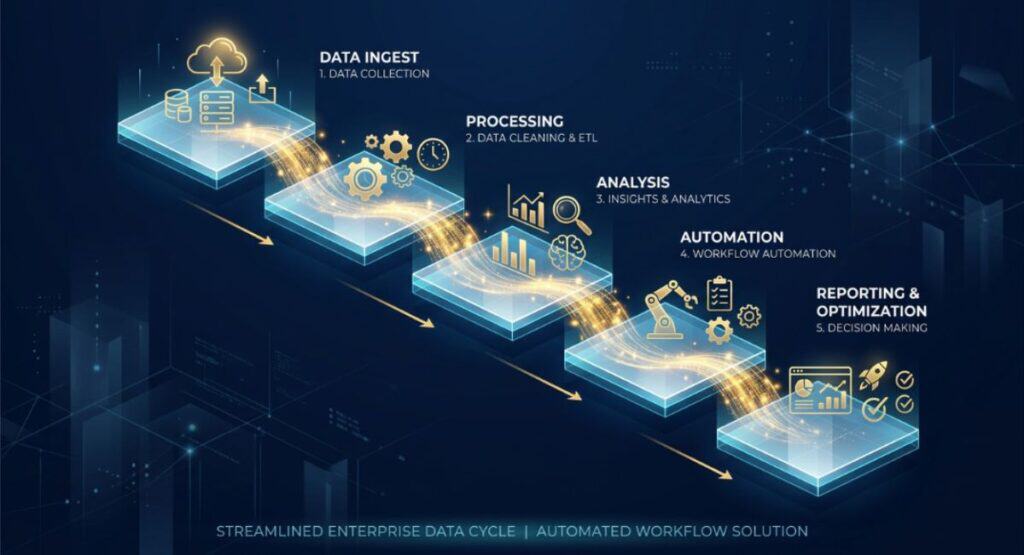
AI Lead Qualification
New lead submitted
↓
Lead information enters workflow
↓
AI analyzes approved lead information
↓
Lead is classified against predefined criteria
↓
CRM record is updated
↓
Sales task is created
↓
Salesperson reviews the classification
↓
Follow-up continues
In this example, AI performs the interpretation and classification. The automation layer handles the movement of information, CRM update, and task creation. The sales team retains control over the classification when review is appropriate.
Start With a Small Workflow
A first deployment should be narrow enough to test without changing an entire department.
A small workflow is easier to:
- Test
- Monitor
- Measure
- Troubleshoot
- Control operational risk
- Expand later
Once the workflow is reliable, additional steps or related processes can be evaluated rather than assuming that everything should be automated at once.
Maintain the Workflow
An AI automation should be reviewed periodically rather than treated as a set-and-forget system.
Review it when:
- Business processes change.
- Source documents or data change.
- Knowledge-base information becomes outdated.
- Integrations change.
- AI outputs become less reliable.
- Approval or compliance requirements change.
A workflow that was appropriate when implemented may need revised rules, testing, permissions, or human-review points as the business changes.
AI Automation Tools and Platforms
The workflows in this article can be implemented using combinations of AI automation platforms, connected business applications, AI models, and data systems.
The right architecture depends on the process rather than the popularity of a particular product.
No-Code and Low-Code AI Automation Platforms
No-code and low-code platforms can connect applications, define triggers and actions, and place AI processing into a workflow without requiring every step to be custom-developed.
They can be useful for businesses that want to prototype or maintain workflows with limited software development resources.
Workflow Automation Tools
A workflow automation layer generally handles the predictable movement of information:
When X happens → process Y → update Z.
AI can be inserted into this process where interpretation or generation is needed.
AI Model and API Integrations
AI models can provide capabilities such as classification, extraction, summarization, or generation.
An API integration can connect those capabilities to the surrounding business process. The implementation should define what information the model receives, what output is expected, and how uncertain results are handled.
CRM Integrations
CRM integrations allow workflows to read or update customer and lead records, create tasks, or pass classifications into sales processes.
For example, a lead workflow may use AI to classify approved lead information before the CRM receives the resulting category.
Email and Communication Integrations
Email and communication systems can serve as triggers or destinations.
A workflow might classify an incoming message, prepare a summary, or create a draft response before a person handles the communication.
Help Desk and Customer Support Integrations
Support systems can connect incoming tickets to classification, knowledge retrieval, response drafting, or escalation workflows.
The support system remains the operational record while AI provides selected processing capabilities.
Accounting and Finance Integrations
Financial workflows may connect document extraction and expense classification with accounting systems.
Because financial records can have important consequences, validation and approval controls should be designed into the workflow.
Project Management Integrations
Project systems can receive draft tasks, owners, deadlines, or summaries generated from approved information.
Meeting-to-task automation is one example where the AI output can prepare work items while people confirm important commitments.
Webhooks and APIs
Webhooks and APIs allow applications to exchange information when a direct built-in connection is unavailable or when a more customized workflow is required.
They can be particularly useful when multiple systems need to participate in one process.
Databases and Spreadsheets
Databases and spreadsheets may serve as sources or destinations for structured workflow information.
They should be treated as controlled business data sources rather than assuming that AI-generated information is automatically correct.
Document Processing Tools
Document-processing capabilities can support workflows involving invoices, forms, reports, applications, contracts, and other documents.
AI extraction should generally be followed by validation before important information enters a business system.
Knowledge Bases and Retrieval Systems
Knowledge bases provide approved information that an AI workflow can retrieve when answering or routing questions.
This is particularly important for support and internal knowledge workflows because it helps distinguish retrieving approved company information from generating an answer based only on a model’s general knowledge.
Example Architecture: Lead Qualification
Website form → automation platform → AI classification → CRM → sales task
The form provides the trigger and input. AI performs the classification. The automation layer moves the result into the CRM and creates the next task.
Example Architecture: Customer Support
Support ticket → AI classification → knowledge base retrieval → response draft → human review
The AI can classify the request and retrieve relevant approved information. The response can then be drafted for an agent to review.
Example Architecture: Invoice Processing
Invoice received → document extraction → validation → accounting system → human approval
AI performs the extraction, while validation and financial approval remain controlled steps in the workflow.
The exact tools depend on the company’s existing technology stack, workflow requirements, budget, security requirements, and integration capabilities.
How to Choose an AI Automation Platform
Consider:
- Ease of integration: Can it connect to the systems the workflow already uses?
- Supported applications: Are the required business applications supported?
- AI/model flexibility: Can the workflow use appropriate AI capabilities?
- Reliability: Does it handle failures predictably?
- Error handling: Can failed steps be identified and recovered?
- Human approval: Can approval checkpoints be built into important workflows?
- Monitoring and logging: Can teams understand what happened when a workflow runs?
- Security and data controls: Can access and sensitive information be managed appropriately?
- Scalability: Can the architecture support greater workflow volume if needed?
- Cost: Does the operating model make sense for the business’s expected usage?
Frequently Asked Questions About AI Automation
What is AI automation?
AI automation combines AI processing with an automated business workflow. AI can interpret, classify, extract, summarize, or generate information while the automation layer connects that result to predefined business actions.
What is the difference between AI automation and traditional automation?
Traditional automation generally follows predefined rules for predictable tasks. AI automation adds AI where information requires interpretation or other cognitive processing, such as classifying an email or extracting information from a document.
What is the difference between an AI workflow and an AI agent?
An AI workflow follows a defined sequence of steps, while an AI agent can operate with greater autonomy and determine actions within a broader objective. Workflows are often easier to control when the process has clear inputs, outputs, and rules.
What are the best AI automation examples for small businesses?
Approachable options include inbox and email triage, meeting-to-task automation, AI content brief generation, AI content repurposing, customer feedback summarization, and CRM data entry and call-note automation. The right choice depends on the business’s existing process and systems.
Which business tasks are best suited for AI automation?
Tasks are often good candidates when they happen repeatedly and involve classification, extraction, summarization, interpretation, or generation. Clear inputs, outputs, measurable outcomes, and an appropriate review process also make implementation easier.
How do I know if a process should use AI or simple automation?
Use ordinary automation when the process can be handled reliably with predefined rules. Introduce AI when the workflow requires interpretation of information such as natural-language messages, documents, feedback, or transcripts.
How much human oversight should an AI automation have?
The amount depends on the consequences of an error. Financial, employment-related, sensitive, customer-facing, and irreversible actions generally warrant stronger controls and appropriate human review.
Can AI automation work with existing business software?
Yes, an AI workflow can connect to existing business systems when suitable integrations, APIs, webhooks, or other connection methods are available. The exact architecture depends on the organization’s technology stack and requirements.
What are the main risks of AI automation?
Potential risks include inaccurate AI outputs, poor-quality source data, outdated information, incorrect routing, privacy or access problems, integration failures, and inappropriate automation of high-impact decisions. Testing, monitoring, clear rules, and human oversight can help manage these risks.
How should a business choose its first AI automation?
Start with a frequent, well-defined process that has clear inputs and outputs and a measurable outcome. Choose a workflow where AI provides a genuine benefit, add appropriate human review, and begin with a small implementation before expanding.
Final Takeaway
Businesses do not need to automate everything to benefit from AI. The better starting point is usually a repetitive process with clear inputs and outputs, manageable risk, and a result that can be measured.
The most useful AI automation examples use AI where interpretation, classification, extraction, summarization, or generation is genuinely needed. Predictable actions can remain with ordinary automation, which helps keep workflows easier to understand and control.
Human review also remains important when errors could have meaningful consequences. Financial records, employment-related workflows, sensitive information, customer-facing communication, and irreversible actions should have appropriate safeguards rather than relying on AI to make independent high-impact decisions.
The practical approach is to start with one narrow workflow. Document the existing process, check whether the required data is ready, define the trigger and output, decide where AI belongs, connect the necessary systems, and establish review and escalation rules. Then measure what actually happens.
If the workflow proves reliable and useful, expand it carefully. The goal is not maximum automation. It is building a business process where AI and automation each handle the parts they are best suited to perform.
Explore More: Flowmez
