

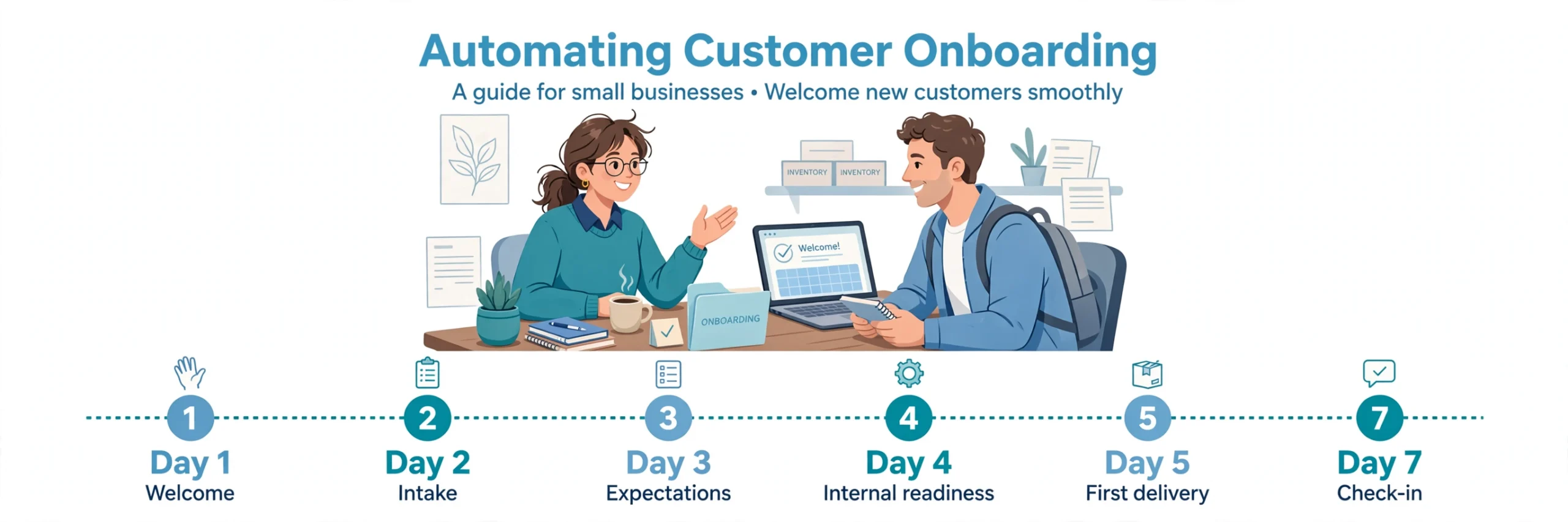
A new customer says yes, pays, and then hears nothing for two days. Nobody sends a welcome message. Nobody asks for the information the work actually needs. The customer emails to ask what happens next, and the reply takes another day. By the time the work starts, the customer is already wondering whether they hired the right business.
That is not a sales problem. It is an onboarding problem. Onboarding is everything that happens between “yes” and the first real result: the welcome, the information you collect, the expectations you set, the first delivery or appointment, and the first check-in. When that stretch is left to memory and inbox searches, good customers get a messy start. When it is automated properly, the same stretch becomes calm and predictable — and the personal parts stay personal, because the routine parts no longer eat the team’s time.
This guide shows you how to automate customer onboarding small business owners can run, in plain language, without code. You will learn what onboarding actually is, what the first seven days should look like, how to write a welcome message that sounds like your business, how to collect the right information once and never ask for it again, how to set expectations a customer can hold you to, how to run the first delivery or appointment, how to check in properly, and where to hand off to a person. No tool in this guide is ranked as the single winner, because the right setup depends on your service, your team, and how many new customers you take on each month.
For the bigger picture, see 25 AI Automation Examples for Businesses in 2026.
What Customer Onboarding Actually Is
This is automated customer onboarding: the welcome, the paperwork, the intake and the first delivery run on a schedule, while a person still handles the conversations that need judgment. It is customer onboarding automation done properly — the customer onboarding process, from yes to first value, without asking the customer the same question twice. This guide shows how to automate customer onboarding for small business owners who want the work to run itself without losing the personal touch.
Customer onboarding starts when a customer says yes — a signed agreement, a confirmed order, a paid deposit, or a booked service — and it ends when that customer is set up and getting real value. It is not the sale. The sale is over. Onboarding is the proof that the sale was a good decision.
For a small business, onboarding usually has five parts:
- Welcome: the customer hears from you quickly, knows what happens next, and knows who to contact.
- Information: you collect what the work needs, once, in one place, and you never ask for the same thing twice.
- Expectations: the customer knows what you will deliver, when, how you will communicate, and what you need from them.
- First delivery or appointment: the customer gets something real — a first result, a first session, a first delivery — on the date you promised.
- Check-in: you ask how it went, fix what did not work, and confirm the next step.
If any of those five is missing, the customer feels it. A missing welcome feels like being ignored. Missing information means the work starts late. Missing expectations mean the customer guesses, and then complains when the guess was wrong. A missing first delivery means the customer paid for a promise, not a result. A missing check-in means a small problem becomes a lost customer.
Onboarding is also where a small business loses the most time without noticing. Every new customer creates the same small jobs: a record to create, a message to send, a form to chase, a task to assign, a reminder to set. Done by hand, those jobs take an hour or two per customer, and they are the jobs most likely to be forgotten on a busy day. Automated, they take minutes, and they happen every time, even on the busiest day.
Contracts, Deposit and Signatures — Before the Welcome Goes Out
Onboarding starts before the welcome message. One trigger starts everything: a signed agreement. Fill the agreement from the CRM record — never retype it by hand — and send it for e-signature with a tool like DocuSign or PandaDoc. When the customer signs, send the deposit or first-invoice link with a payment link, and only then does the work start. The order matters: signature, then invoice, then payment, then workspace. Never take a deposit before the agreement is signed, or you may end up refunding money on a deal that was never agreed. If the agreement is unsigned after two business days, send one reminder. After that, a person follows up — no third automated reminder. This is automated customer onboarding at its most useful: the paperwork moves itself, and the customer only hears from a person when something actually needs one.
Book the Kickoff While the Welcome Is Warm
Put a booking link for the kickoff call inside the welcome email — a Calendly link, limited to slots the team can really cover. The kickoff call should happen in one to two days, not five to seven, while the customer still remembers why they said yes. The booking form should already carry the customer’s name and goal, so the call starts as a strategy session, not a discovery call. Kickoff scheduling is the one step that must feel personal even though the link is automated: the customer picks a time, a person shows up prepared, and nothing about the call is read from a script.
The First 7 Days: A Simple Timeline
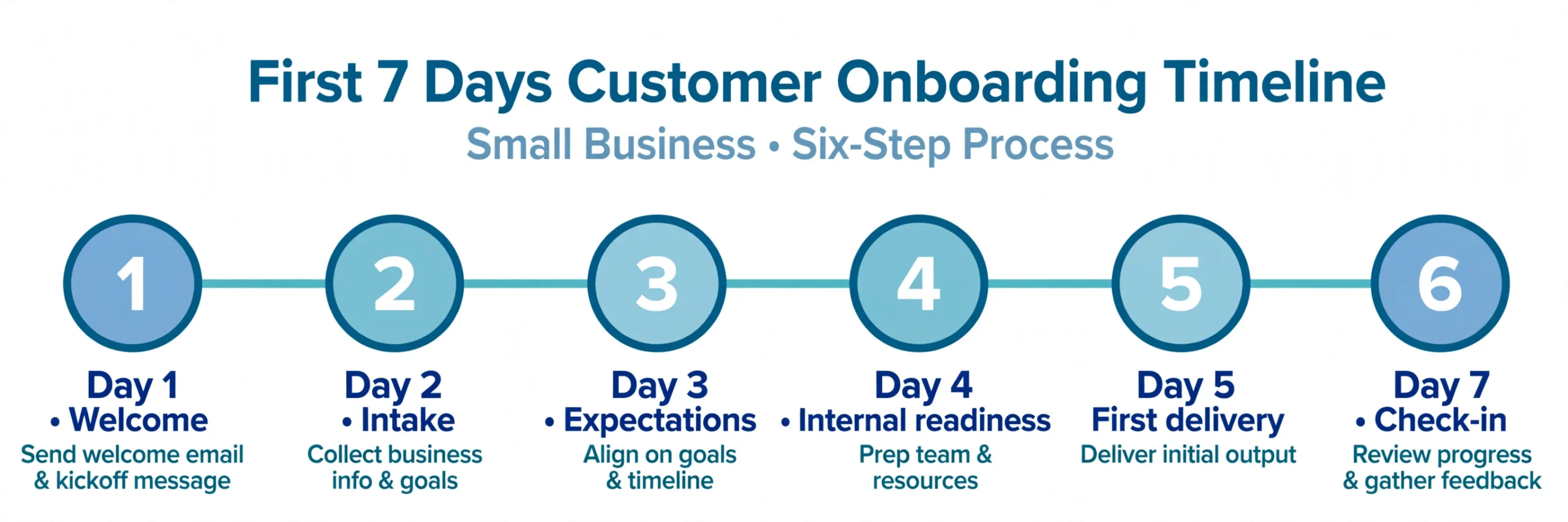
Most competitors describe onboarding as stages or triggers. That is correct, but it does not tell a small business owner what to do on Monday. This timeline does. It covers the first seven days after a customer says yes. Use it as your default, and change the dates to fit your service — a same-day service business will compress it, a project business will stretch it — but keep the order.
Day 1: Welcome, within hours
The customer gets a welcome message on the same day they say yes, ideally within a few hours. The message names the service, names the person who owns their onboarding, gives the next step, and gives one way to reach a person. No customer should have to ask “what happens next” on day one.
Day 2: Intake, one form, once
The customer gets one short intake form asking for only what the work needs. The form is the same for every customer of that service. Nothing on it is asked for again later.
Day 3: Expectations, in writing
The customer gets a short written summary: what you will deliver, by when, how you will communicate, how often, and what you need from them and by when. Both sides can point to the same page later.
Day 4: Internal readiness
Your team prepares: the record is complete, the workspace or file is set up, the first task is assigned with a due date, and anything the customer sent has been checked. Nothing here is visible to the customer, but everything later depends on it.
Day 5: First delivery or appointment
The customer gets the first real result — a first session, a first delivery, a first draft, a first appointment — on the date you promised on day 3. This is the moment onboarding earns its keep.
Day 7: Check-in
You check in with the customer: did the first delivery arrive as expected, is anything unclear, is anything blocked, and what is the next step. You write down what they said. If something needs fixing, you fix it and say so.
The Welcome Message: Fast, Personal, and Short
The welcome message is the first thing a new customer reads after saying yes, and it sets the tone for everything that follows. It has one job: make the customer feel looked after, and tell them what happens next. It does not need to sell anything. The sale is already made.
What a good welcome message contains
- The customer’s name, used once, spelled correctly.
- The service they bought, in plain words.
- The name of the person who owns their onboarding.
- The next step, with a date: “Your intake form is below — it takes about five minutes, and your kickoff is Thursday at 10am.”
- One way to reach a person: a phone number or an email address that someone actually answers.
What to automate, and what to keep human
Automate the timing and the delivery: when the agreement is signed or the payment is confirmed, the welcome message goes out within hours, every time, even on a weekend. Use a template for the structure — greeting, service, owner, next step, contact — but leave the personal parts to a person. A template with the customer’s name filled in by a workflow is fine. A template that pretends a person wrote a personal note, when nobody did, is not fine, and customers can tell.
The safest rule is this: automate the sending, and let a person review the message before it goes out for your first few customers, and for any customer whose situation is unusual. Once the template is proven, the automation can send it on its own — but the owner still reads the replies every morning.
A welcome message that works
Keep it short. Three or four sentences are enough. Here is the shape, in your own words:
“Welcome, [name]. Thank you for choosing [service]. I am [owner], and I will look after your onboarding. Your next step is [intake form / kickoff], on [date]. If anything is unclear, reply to this message or call [number] — a person will answer.”
If your welcome message needs more than that to make sense, the onboarding is too complicated, and the message is not the problem.
One welcome message is not a sequence — the full sequence is in the next section. Include the kickoff call booking link in the welcome email, limited to slots the team can really cover, so the customer can book while the welcome is still warm.
Turn One Welcome Into a Short Sequence
One welcome message is not a sequence. A welcome sequence is four short messages, each with one job. Day 0: the welcome itself, with the next two steps and the kickoff booking link. Day 1: an intake reminder, with two examples of good answers so the customer knows what to write. Day 3: a setup guide — what happens next, who does what, and when the first delivery lands. Day 6: a short status note — here is what we have completed, here is what is left, and here is who to contact. Keep every message short; the kickoff call itself stays human. And keep one reminder sequence for anything missing: if the agreement, the deposit or the form is still open after two business days, send one reminder, then alert a person. No third automated message — after that, a person follows up.
Collect the Right Information Once — and Never Ask Again
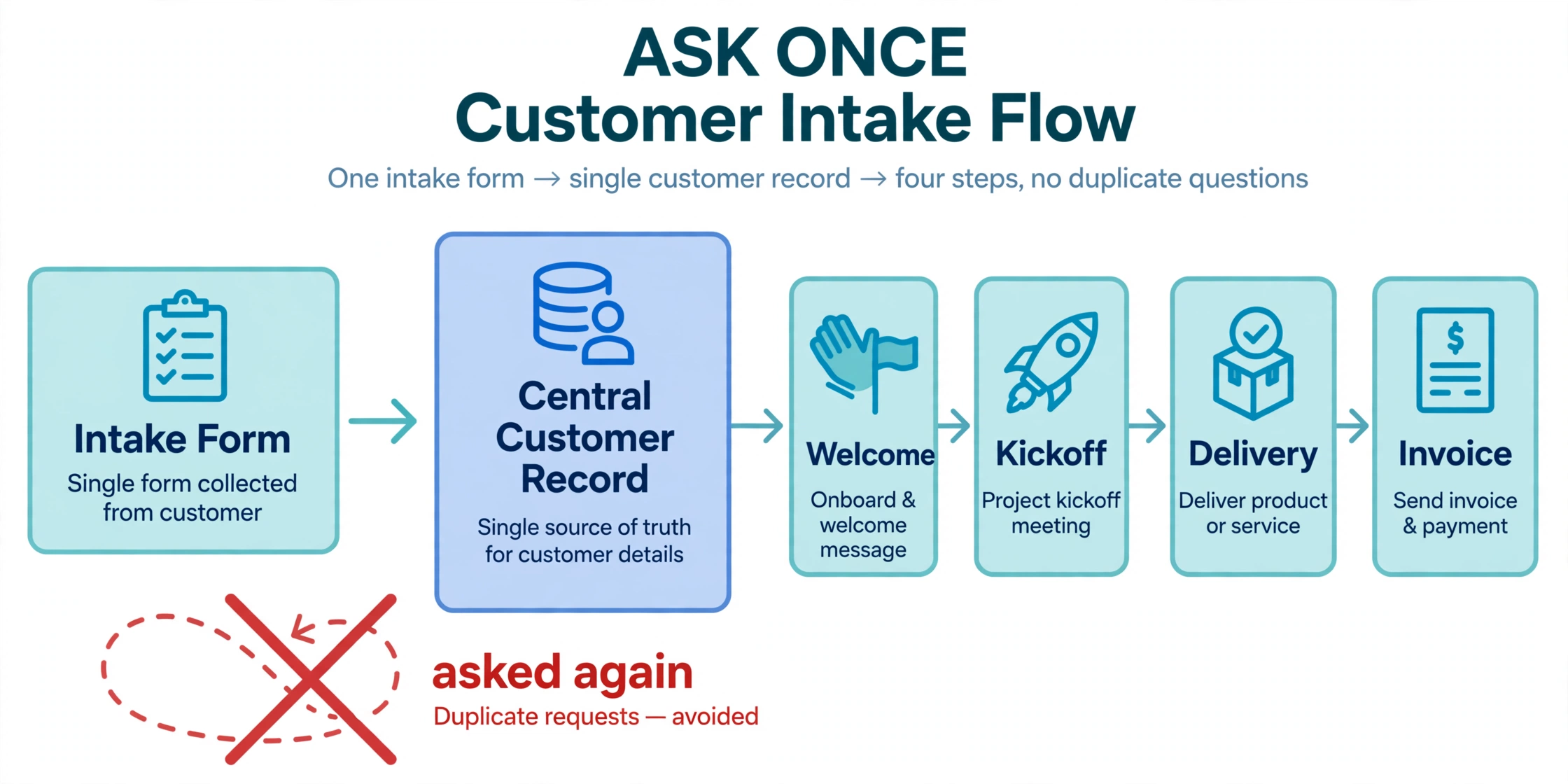
Nothing damages a new customer’s trust faster than being asked for the same information twice. It tells the customer that nobody is keeping track, and that their time does not matter. The fix is simple, and it is a discipline, not a tool: collect each piece of information once, store it in one place, and let every later step read from that place.
Decide what you actually need
Before you build a form, write down the information the work truly needs. For most small businesses, that is a short list: the customer’s name and contact details, what they bought, the date they need it, the access or files the work requires, and any preferences that change how the work is done. Everything else is nice to have, and nice-to-have questions are what make forms long, and long forms are what customers abandon.
A useful test for each field on your form: if nobody on your team will use this answer in the first seven days, take the field off the form. You can ask for it later, when it is actually needed, and the customer will understand why.
One form, one record, one source of truth
Build one intake form per service, and make it the only way information enters the system. When the form is submitted, the answers go into one customer record — a CRM record, a spreadsheet row, or a project record — and every later step reads from that record. The welcome message, the kickoff agenda, the first delivery, and the invoice all use the same record. Nobody retypes anything, and nobody asks the customer to repeat themselves.
That record needs an owner. One named person checks that every new record is complete, chases anything missing, and fixes anything wrong. A record that nobody checks is a record that silently goes out of date, and an out-of-date record is worse than no record, because the team trusts it and acts on it.
Chasing missing information, politely
Some customers will not finish the form on the first day. That is normal. Automate the reminder, not the pressure: one polite reminder after two days, and one more after four days, each with the same link and a note about what is still missing. After that, a person follows up, because a customer who has not replied twice may be confused, busy, or unhappy — and none of those is fixed by a third automated reminder.
Never collect sensitive information by email, and never put customer personal data into a test, a shared example, or an AI prompt. If the information is sensitive — health, financial, legal, or access details — collect it through a secure form, limit who can see it, and delete what you no longer need.
Keep access details safe: never ask for passwords or card numbers by email or in a plain form. Payment always goes through the processor’s own link, access details live in one secured place, and temporary access is deleted when the job ends.
Create the Workspace Automatically
Once the intake form is in, create the workspace without anyone opening a blank folder. A Google Drive folder and a project in Notion, ClickUp, Asana or Trello — whichever the team already uses — is created from a template, with tasks, due dates and owners already filled in, and the customer’s intake answers attached to it. The welcome email then has one job: three actions and nothing else — book the kickoff, complete the intake, open the workspace link. No attachments, no long email. If the workspace is not created automatically, someone will forget it, and the first delivery will start with a search for the customer’s details instead of the work itself.
Connect It With One Tool (and Where AI Fits)
The onboarding workflow runs in this order: trigger, then CRM record, then welcome and intake link, then workspace, then tasks, then notify the team, then a 48-hour reminder if the kickoff is not booked. One automation tool holds it together — Zapier, Make or n8n — and the CRM is the record it all hangs on. Start in your CRM if it automates onboarding natively; HubSpot is the CRM-first option many small teams already have. Add Zapier or Make only for the apps your CRM does not talk to. Competitors call the same build client onboarding automation, and the shape is the same: one trigger, one record, one sequence. This is also where AI fits, and only where it fits: AI reads long intake answers into tidy CRM fields and flags what is missing; it drafts the welcome note for a person to approve; it condenses the agreement, the intake and the call notes into a five-line brief before the first visit; and it answers routine questions like what the customer should prepare, handing everything else to a person. AI never changes price, scope or legal terms alone. Before you switch it on, test the whole onboarding workflow for small business use end to end with a fake client, then watch the first three real runs yourself. To automate client onboarding safely, the test comes first and the real customer second.
Set Expectations in Writing
Most onboarding complaints are not about the work. They are about a gap between what the customer expected and what happened. The customer expected a reply within a day; the business replies within three. The customer expected the first delivery on Friday; the business meant the following Friday. Those gaps are preventable, and the prevention is a short written summary both sides can point to.
What the expectations summary covers
- What you will deliver: the service, in plain words, and what is not included.
- When: the date of the first delivery or appointment, and the date of the next step after that.
- How you will communicate: the channel (email, phone, or a message thread), how often, and who the customer contacts.
- What you need from the customer: the information, files, or decisions you need, and by when.
- What happens if something is late: who tells whom, and how fast.
Write it in plain language, not legal language. The agreement is the legal document. The expectations summary is the human document. A customer should be able to read it in two minutes and know exactly where they stand.
Why this stays partly human
Automate the sending: when the intake form is complete, the expectations summary goes out automatically, with the customer’s details filled in from the record. But the summary itself should be written or reviewed by a person for each customer, because expectations are where judgment lives. A customer who needs a different timeline, a different scope, or a different first delivery is not an exception to be handled by a template. They are a person to be talked to, and the conversation is what makes the summary true.
If the customer disagrees with anything in the summary, that disagreement is good news: you found it on day 3, when it is cheap to fix, instead of on day 14, when it is a complaint.
The First Delivery or Appointment
The first delivery is the moment onboarding either works or fails. Until then, the customer has paid for a promise. After it, they have evidence. That is why the first delivery deserves more care than any other step, and why it should never be late without the customer hearing about it first.
Make the first delivery small and on time
Choose the smallest real result you can deliver on the promised date, and deliver it on that date. A first draft, a first session, a first report, a first appointment — whatever counts as real value for your service. A small result delivered on time builds more trust than a large result delivered late, because it proves the business keeps its word.
Automate the preparation, not the delivery itself: the record is complete, the files are ready, the task is assigned, the reminder went out, and the customer knows the date and time. The delivery itself — the session, the call, the handover — is done by a person, and that person confirms it happened, in the record, on the same day.
If the first delivery will be late
Tell the customer before the date, not after it. A short message from a person — what is late, why, and the new date — keeps trust. A late delivery discovered by the customer destroys it. Automate the warning: if the readiness checklist is not complete one day before the delivery date, the owner gets an alert, and the owner contacts the customer. The automation watches the date. The person makes the call.
The Check-In: Day 7 and After
The check-in is the most skipped step in onboarding, and the most valuable. It is a short, honest conversation after the first delivery: did it arrive as expected, is anything unclear, is anything blocked, and what happens next. It takes ten minutes, and it catches the problems that would otherwise become lost customers.
How to run the check-in
Automate the reminder: seven days after the first delivery, the owner gets a task to check in, with the customer’s record attached. The check-in itself is a person talking to a person — a short call or a short message, in the customer’s words, not a survey form. Ask three questions: what went well, what was unclear, and what should happen next. Write down the answers in the record, in the customer’s words where possible.
If something needs fixing, fix it and tell the customer it is fixed. That one loop — problem, fix, tell them — is what turns a new customer into a repeat customer. If nothing needs fixing, confirm the next step and the next date, so the customer never has to ask what happens now.
After day 7: the handoff to ongoing service
Onboarding ends when the customer is set up and getting value. After the day-7 check-in, hand the customer over to ongoing service with a short note: what was delivered, what was agreed, what is next, and who owns it now. The handoff is a record entry, not a meeting. If the same person owns both onboarding and ongoing service, the handoff is a checklist item marked done, and the record is the proof.
For the follow-up work that comes after onboarding, see Automate Lead Follow-Up: From Form to CRM to Email, Without Losing Leads — the same discipline of one record, one owner, and one next step applies.
Hand Off to a Person Where Judgment Is Needed
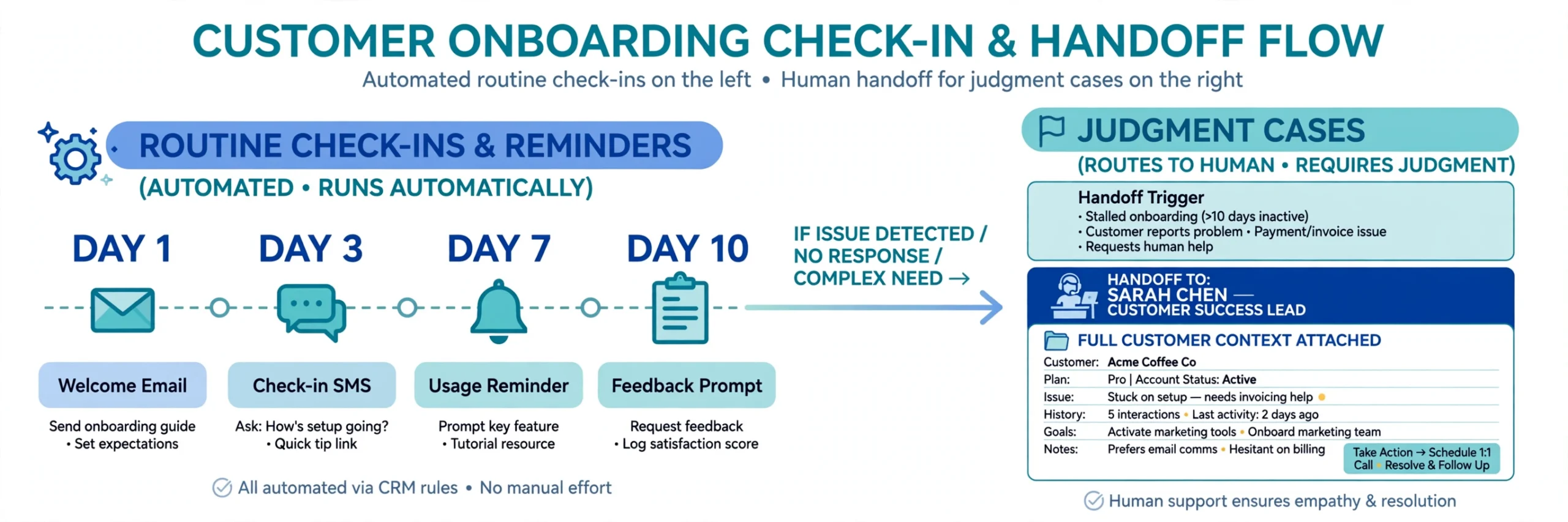
Automation handles the routine. It does not handle judgment. The difference between an onboarding system that helps and one that damages trust is a clear, written handoff rule: exactly which cases go to a person, who that person is, and how fast they reply.
Send these to a person, always:
- Complaints and unhappy customers. A complaint needs a person reading it and replying to it, not a template.
- Money decisions. Refunds, discounts, payment plans, or a disputed amount. For payment follow-ups, see Automate Invoice Payment Reminders for Your Small Business. No workflow should promise or change money without a person approving it.
- Scope and expectation changes. A customer who wants something different from what was agreed needs a conversation, not an automated confirmation.
- Sensitive or personal situations. A customer’s health, family, legal, or financial details need judgment and discretion, not a queue.
- Anything the workflow does not understand. A message that does not match any category, a form with an unexpected answer, a request the workflow was not built for. The workflow should hand it over with the full context attached, not guess.
For each handoff, write down three things: who the person is, how they are alerted, and what “done” looks like. If the alert goes to an inbox nobody checks, it is not a handoff; it is a dead end. If nobody knows who owns the handoff, it is not a system; it is a hope.
A useful test: pick one real customer from last month who needed judgment, and trace them through your workflow on paper. Does their case reach a person, with the context they need, in time to reply well? If not, the handoff rule needs rewriting before the workflow goes live.
A Worked Example: One Customer, Seven Days
Take a small US service business — an owner and one part-time helper — that takes on about three new customers a month. Their old onboarding was memory and inbox: the owner sent a welcome email when they remembered, the customer sent information by email, and the first delivery happened when someone found time. Customers complained about silence, and the owner lost two customers in one quarter to it.
Here is the same business with the seven-day timeline, for one customer, a local bakery that booked a monthly ordering service.
On Monday, day 1, the bakery signs the agreement. Within two hours, the welcome message goes out automatically: the owner’s name, the service, the next step — the intake form — and the owner’s phone number. The bakery replies the same day: “Got it, thank you.”
On Tuesday, day 2, the bakery completes the one intake form: delivery address, weekly order, preferred delivery day, and a contact for changes. The answers go into one customer record. Nobody asks for the address again.
On Wednesday, day 3, the owner reviews the intake and sends the expectations summary: first delivery Friday, weekly deliveries every Friday after that, orders confirmed by email each Thursday, and the bakery’s contact for changes. The bakery agrees by reply.
On Thursday, day 4, the helper checks the record: address confirmed, delivery day set, first order written down, and the delivery route updated. The readiness checklist is complete, so no alert fires.
On Friday, day 5, the first delivery arrives on time, with a short note from the owner. The helper marks the delivery done in the record the same day.
The following Friday, day 7 after the first delivery, the owner calls the bakery: the delivery was on time, the order was right, and one item needs changing for next week. The owner changes it in the record, confirms the change by message, and the next delivery uses the new order.
Nothing in that week was complicated. The automation did the timing, the sending, and the reminders. The people did the welcome review, the expectations conversation, the delivery, and the check-in. That is the whole system: routine work automated, judgment work human, and one record holding it all together.
Measure Onboarding Honestly
Most articles about onboarding automation quote a number of hours saved, or a percentage improvement, as if it were a fact. It is not a fact unless you measured it, and the measurement is simpler than most guides make it sound — and more honest.
Measure time to first value, not hours saved
The number that matters most is time to first value: the days from the customer saying yes to the customer receiving the first real result. Write it down for each new customer: the date they said yes, and the date of the first delivery. That is your baseline. If it is seven days now and five days after you automate, that is a real improvement, measured in days, not in a guessed number of hours.
Measure two more numbers, the same way
- Time to kickoff: the days from yes to the kickoff or first appointment. If customers wait longer than you promised, the timeline needs fixing, not the tool.
- Follow-ups per customer: how many times the customer had to ask “what happens next” or “did you get my information”. Count them. If that number falls to zero, the onboarding is working, because the customer never had to chase you.
Measure those three numbers for one month before you change anything, then for one month after. Report the result in plain terms: what the numbers were, what they are now, and what changed. If the improvement is small, say so. A small, honest improvement that repeats for every customer is worth more than a large, invented saving that nobody believes.
Also watch for warning signs that the automation has gone too far: a customer who says the messages felt impersonal, a welcome that went out with the wrong name, a check-in that never happened because the reminder went to an inbox nobody checks. Any of those is a reason to pause, review, and put a person back into that step before you automate more.
Automate Customer Onboarding Small Business Checklist
Use this checklist before you switch any onboarding workflow on:
This is the onboarding checklist for small business owners to run once per customer. Map one real client first, then build in this order: trigger, welcome, agreement and deposit, then scheduling, setup and reminder — then run one real client through it with a person watching.
- One named person owns onboarding for each new customer, including failures, updates, and the pause button.
- The trigger is written down: the exact event that starts onboarding (signed agreement, confirmed payment, or booked service). (Day 0)
- The welcome message is written, reviewed, and sent within hours of the trigger, every time. (within hours)
- One intake form per service exists, asking only for information the work needs in the first seven days. (Day 2)
- The form feeds one customer record, and every later step reads from that record. (Day 2)
- The expectations summary is written in plain language and sent by day 3, with delivery date, communication rules, and what you need from the customer. (Day 3)
- Internal readiness is checked on day 4, and the owner is alerted if anything is incomplete. (Day 4)
- The first delivery or appointment happens on the promised date, and is confirmed in the record the same day. (Day 5)
- The day-7 check-in is scheduled, done by a person, and written down in the record. (Day 7)
- Handoff rules are written: complaints, money decisions, scope changes, sensitive situations, and anything the workflow does not understand go to a named person.
- No customer personal data is used in test data, shared examples, or AI prompts.
- A manual fallback exists, so the business can welcome, inform, and deliver by hand while a workflow is paused or broken.
- Agreement signed and deposit paid before work starts
- Kickoff booked within 2 days
- Workspace and project created from template, with intake answers attached
If a workflow cannot pass the owner, trigger, and handoff boxes, do not switch it on yet. Fix the process first, or leave the work with a person.
Common Mistakes
Automating the welcome and forgetting the person
A welcome message that goes out on time is not the same as a customer who feels welcome. If nobody reads the replies, nobody owns the onboarding, and nobody checks in, the automation is a machine that sends messages into the dark. Automate the timing. Keep a person on the replies.
Asking for the same information twice
Every repeated question tells the customer that nobody is keeping track. Collect each piece of information once, store it in one record, and let every later step read from that record. If a step asks the customer for something the record already has, the step is broken, not the customer.
Setting expectations by memory
Expectations that live in one person’s head cannot be checked, and they cannot be pointed to when something goes wrong. Write the expectations summary down, send it by day 3, and keep it in the record. A customer who can point to the same page you can point to is a customer you can keep.
Letting the first delivery slip without telling the customer
A late first delivery is survivable. A late first delivery the customer discovers on their own is not. If the readiness checklist is incomplete the day before, the owner gets an alert and contacts the customer before the date, not after it.
Automating replies to complaints
An automated reply to an unhappy customer tells them nobody read their message. Complaints, refunds, and sensitive situations always go to a person. The workflow can sort and route them. It should never answer them. For common questions that do have approved answers, see Automate Customer Support Replies with an FAQ Workflow (A Small-Business Guide).
Measuring onboarding with a guess
“We save hours on onboarding” is not a measurement. Measure time to first value, time to kickoff, and follow-ups per customer, before and after, and report the honest numbers. A small real improvement beats a large invented one, because only the real one helps you decide what to automate next.
Building for every customer type at once
Onboarding for a one-off buyer, a monthly subscriber, and a project client are three different workflows. Build one first, for your most common customer type, prove it for a month, and only then build the second. A workflow built for everyone fits nobody.
Never checking the workflow again
A workflow that worked in January may not match the business in March. Services change, prices change, team members change. Check each onboarding workflow once a month: does it still match the process, are failures being read, and does the record still hold the truth? A workflow nobody checks is a workflow waiting to fail quietly.
Frequently Asked Questions
How do I automate customer onboarding for a small business?
Start with one service and one customer type. Write down the trigger that starts onboarding, build one intake form, write the welcome message and the expectations summary, set the seven-day timeline, and automate only the timing, sending, and reminders. Keep the conversations, the expectations, and the check-in human. Prove it with one customer, measure time to first value, and only then expand to the next service.
What should I automate first in onboarding?
Automate the parts that happen the same way for every customer: creating the record when the deal is confirmed, sending the welcome message, sending the intake form, reminding the customer about missing information, assigning internal tasks with due dates, and reminding the owner about the day-7 check-in. Keep human the welcome review, the expectations conversation, the first delivery, the check-in itself, and every judgment call.
Do I need special onboarding software?
No. Most small businesses can do this with the tools they already have: a CRM or spreadsheet for the record, a form for intake, email for messages, a calendar for the kickoff, and one workflow tool to connect them. Do not buy a special platform until the process is written down and proven by hand. A platform does not fix a process that is not written down.
How long should customer onboarding take?
It depends on the service, but the first seven days are the part that matters most: welcome within hours, intake by day 2, expectations by day 3, readiness by day 4, first delivery by day 5, check-in by day 7. If your service delivers the same day, compress the timeline. If it is a long project, stretch it — but keep the order, and keep the check-in.
Will automation make onboarding feel impersonal?
It will if you automate the personal parts. It will not if you automate only the coordination: timing, sending, reminders, record creation, and task assignment. Customers do not mind automated reminders. They mind automated apologies, automated promises, and automated answers to questions that needed a person. Automate the coordination, and let people do the caring.
What if a customer does not complete the intake form?
Send one polite reminder after two days, and one more after four days, each with the same link and a note about what is still missing. After that, a person follows up, because a customer who has not replied twice may be confused, busy, or unhappy — and none of those is fixed by a third automated reminder.
When should I hire someone for onboarding instead of automating?
Hire when the work needs judgment, conversation, or care that no workflow can provide — handling complaints, advising customers, setting expectations for unusual cases — and when there is enough of that work to fill a person’s time. Automate first when the work is frequent, repetitive, and rule-based. The right order is usually automate the routine, then hire for the human work that remains, not the other way around.
Do I need a contract or e-signature to automate onboarding?
Yes. The agreement is filled from the CRM record, signed digitally with an e-signature tool, and the deposit is asked for only after signing. Without a signed agreement, there is nothing to automate — the welcome, the workspace and the kickoff all wait for it.
When should I ask for the deposit?
After the agreement is signed, through a payment link. Payment confirmation is the trigger for the next stage: workspace, tasks and kickoff. Asking before signing risks refunding a deposit on a deal that was never agreed.
How do I schedule the kickoff call?
Put a booking link in the welcome email, limited to slots the team can really cover, and aim for one to two days after the welcome. The booking form should already carry the customer’s name and goal, so the call starts as a strategy session.
Do I need new software?
Usually not. Most small teams already have the pieces: a CRM, a payment processor, an e-signature tool and one automation tool such as Zapier or Make. Buy new software only when a piece is missing entirely — not because a new tool promises to do everything.
Conclusion
Automating customer onboarding in a small business is not about removing people from the process. It is about a simple discipline: welcome the customer within hours, collect the right information once and never ask again, set expectations in writing by day 3, deliver the first real result on the promised date, and check in on day 7. Automate customer onboarding small business teams can sustain by automating the timing, the sending, the reminders, and the record-keeping — and keeping the conversations, the expectations, the delivery, and the check-in human.
That discipline is what turns the stretch between “yes” and the first result from the messiest part of a small business into the calmest part of it — and it is what makes a new customer feel, in their first week, that they hired the right business. For the bigger picture, return to 25 AI Automation Examples for Businesses in 2026.

Flowmez publishes practical AI workflow guides, tested steps and honest tool reviews to help small businesses save time.